Rocket Money vs Copilot: what's the actual difference?
One is a better tracker. The other is better at clawing back money you're already losing. Here's how to tell which one you need.
Copilot is the better expense tracker. Its AI categorization learns your habits and its budget dashboard is the cleaner one, but it only runs on iPhone, iPad, Mac, and the web. Rocket Money is better at finding and cancelling subscriptions and negotiating bills, runs on Android, and has a free tier. Pick by your actual leak.
Rocket Money vs Copilot, side by side
| Rocket Money | Copilot Money | |
|---|---|---|
| Expense tracking & categorization | Automatic, general categories | AI that learns your labels over time |
| Budgeting | 3 category budgets free, unlimited on Premium | Category budgets with optional rollovers |
| Subscription cancellation | Yes, done for you on Premium | No, tracks recurring charges only |
| Bill negotiation | Yes, 35% to 60% of first-year savings if it works | No |
| Platforms | iPhone, Android, web (Premium) | iPhone, iPad, Mac, web. No Android |
| Free tier | Yes | No, 1-month free trial |
| Price | Free, or Premium at $7 to $14/mo (you pick) | $13/mo or $95/yr |
| Best for | Cutting recurring bills, Android, a $0 budget | Detailed tracking on Apple devices |
- Rocket Money
- Automatic, general categories
- Rocket Money
- 3 category budgets free, unlimited on Premium
- Rocket Money
- Yes, done for you on Premium
- Rocket Money
- Yes, 35% to 60% of first-year savings if it works
- Rocket Money
- iPhone, Android, web (Premium)
- Rocket Money
- Yes
- Rocket Money
- Free, or Premium at $7 to $14/mo (you pick)
- Rocket Money
- Cutting recurring bills, Android, a $0 budget
Prices and features checked October 2026. Rocket Money also sells Premium+ at $15 a month, which adds its AI assistant and drops the bill negotiation fee.
What's the difference between Rocket Money and Copilot for expense tracking?
Copilot tracks expenses more precisely, and Rocket Money tracks them well enough for free.
 Copilot Money
Copilot was built around the tracking part. Every transaction gets tagged automatically, and when you fix a wrong one, the AI remembers. A month in, you're correcting far less. The dashboard is the nicest in the category, and you can see where each category stands without digging. If you're the kind of person who opens a budgeting app because you enjoy it, this is the one.
 Rocket Money
Rocket Money auto-sorts transactions into general categories and gives you a spending breakdown, even on the free plan. It works. It's just broader, and tracking isn't really the headline feature. The app is organized around your recurring charges, because that's where it makes its case.
If precise categories are what you care about, Copilot wins this round without much argument. Our best budgeting apps for iPhone roundup puts it near the top for the same reason.
Is Copilot Money better than Rocket Money?
Copilot is better for budgeting on Apple devices, and Rocket Money is better for everything that involves cutting a bill.
For budgets, Copilot gives you a target per category and lets you roll leftover (or overspent) money into next month, which is how real life works when car insurance lands every six months. Rocket Money's free plan caps you at three category budgets. Premium removes the cap, but the budgeting is still simpler than Copilot's.
Where Rocket Money pulls ahead is the money that leaves without you touching anything. It finds your subscriptions, will cancel many of them for you on Premium, and will try to talk your cable, phone, or internet provider into a lower rate. Copilot will show you those same charges in a tidy list and leave the phone call to you.
Then there's Android. Copilot doesn't have an app for it. If anyone in the household is on Android, that settles it. If you're leaning away from both, we covered the field in Rocket Money alternatives and Copilot Money alternatives.
Which is cheaper, Rocket Money or Copilot?
Rocket Money is cheaper, since its free tier costs nothing and Copilot has no free tier at all.
Paid against paid, it's closer than you'd think. Rocket Money Premium runs on a slider where you choose roughly $7 to $14 a month, billed monthly, with a 7-day free trial. At the bottom of that slider you're paying about $84 a year. Copilot is $13 a month, or $95 a year if you pay up front (about $7.92 a month), and you get a full month free to try it.
So Copilot on the annual plan costs about the same as Rocket Money at the low end, and less than Rocket Money at the high end. Two catches on the Rocket Money side. Bill negotiation is billed separately: if they save you money, you pay 35% to 60% of the first year's savings. And the web dashboard is a Premium feature, so free users are on the phone app only.
Does Copilot cancel subscriptions like Rocket Money?
No, Copilot tracks your subscriptions but you have to cancel them yourself.
Copilot scans your transactions, and surfaces your recurring charges in one place. That's useful, and plenty of people need nothing more than a list to go cancel the gym they forgot about. Rocket Money's Premium tier goes a step further and cancels many subscriptions on your behalf, so you skip the retention script and the hold music. If your bank statement has a long tail of $9.99 charges, that service alone can pay for itself. We get into how that works in Rocket Money vs Hinder.
What if tracking isn't your problem?
Then neither app will fix it, because both of them report on spending after it happens and neither one can stop a purchase.
Here's the honest pattern. You set a $200 food delivery budget in Copilot or Rocket Money. On the 19th the bar turns red. On the 22nd you order DoorDash anyway, because a red bar in an app you didn't open doesn't get between you and the checkout button. The tracker did its job. The money's still gone.
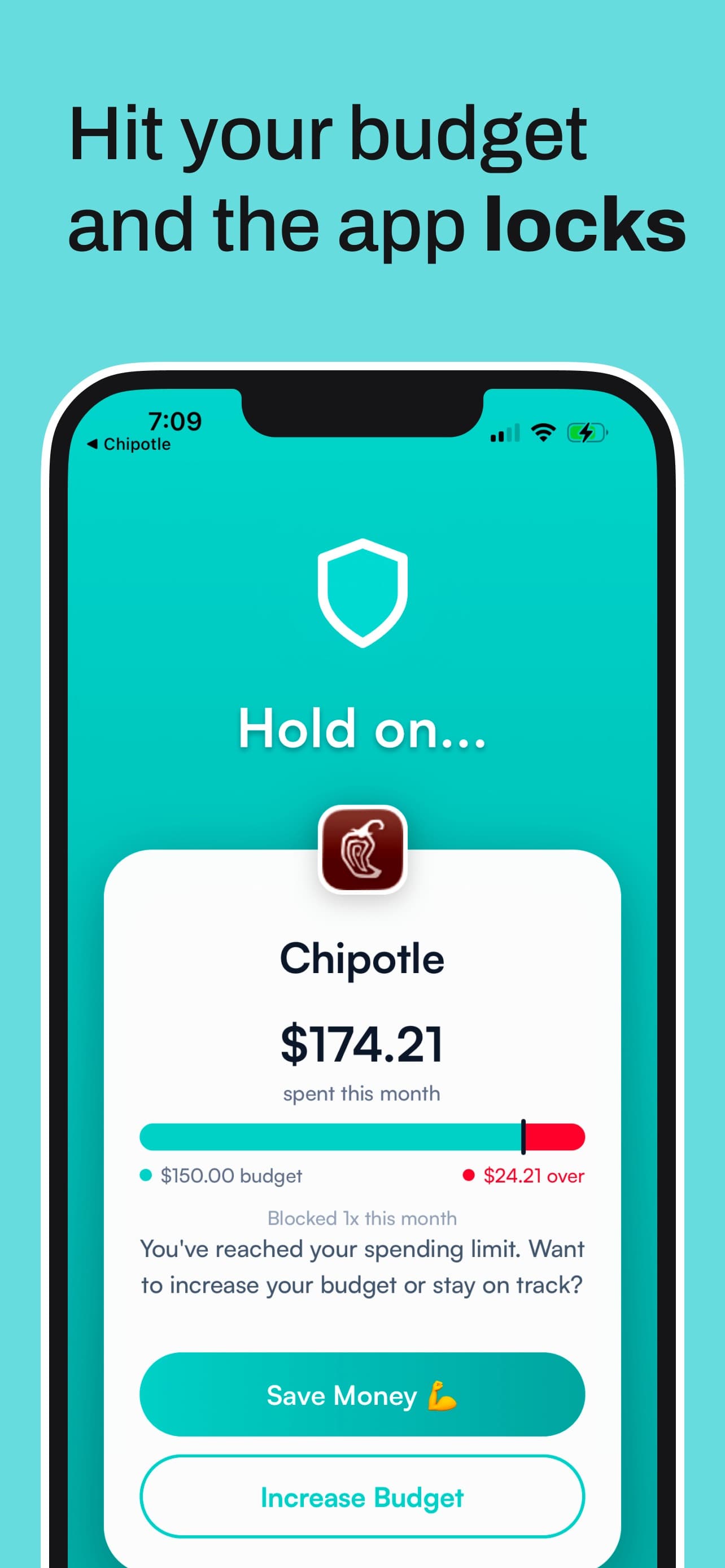
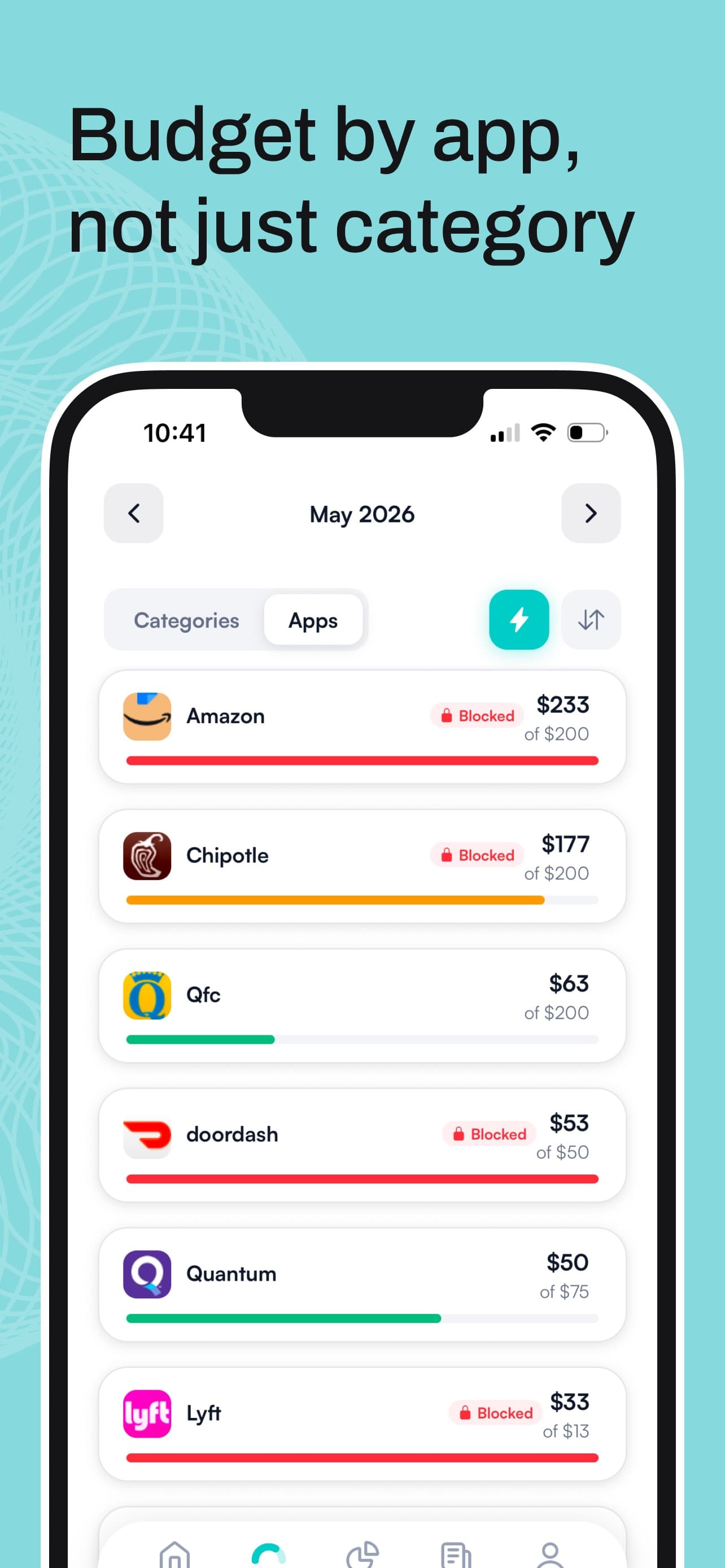
That's the gap Hinder covers. It connects to your bank through Plaid, and you set monthly limits by category or for a single app. At 80% you get a warning. At 100% it locks the spending apps you picked using iOS Screen Time, so DoorDash or Amazon just stops opening. You can override it, but it's built to be annoying enough that you'll think twice, and per-app no-spend streaks give you something to protect.
To be clear about what it isn't: Hinder doesn't cancel subscriptions or negotiate bills, so it's no replacement for Rocket Money there. It's also iPhone only (iOS 16 and up). It sits fine alongside either app. Keep Copilot for the detailed picture or Rocket Money for the recurring bills, and let Hinder handle the impulse buys they can only describe. The pairing with Copilot is covered in Copilot Money vs Hinder.
Common questions
What's the difference between Rocket Money and Copilot for expense tracking?
Both connect to your bank and categorize transactions automatically. Copilot's AI learns how you label things and gets more accurate the longer you use it, and its dashboard is the more polished of the two. Rocket Money's free tier sorts transactions into general categories, which is fine for a rough picture but less precise.
Is Copilot Money better than Rocket Money?
For tracking and budgeting on an iPhone, iPad, or Mac, yes. For cancelling subscriptions, negotiating bills, using Android, or paying nothing, no. Rocket Money does all four of those and Copilot does none of them.
Which is cheaper, Rocket Money or Copilot?
Rocket Money, because it has a free tier and Copilot doesn't. Rocket Money Premium is a pay-what-you-want slider of roughly $7 to $14 a month. Copilot is $13 a month or $95 a year, which works out to about $7.92 a month, after a one-month free trial.
Does Copilot Money cancel subscriptions like Rocket Money does?
No. Copilot finds and tracks your recurring charges so you can see them, but you cancel them yourself. Rocket Money Premium will cancel many subscriptions on your behalf.
Is Rocket Money or Copilot available on Android?
Rocket Money is. It has apps for iPhone and Android, plus a web dashboard for Premium members. Copilot has no Android app; it runs on iPhone, iPad, Mac, and a web app it launched in December 2025.