
7 Budgeting Apps Reviewed (2026): Which Ones Actually Stop You From Overspending?
We compared YNAB, Copilot, Monarch, Rocket Money, PocketGuard, Goodbudget, and Hinder on the one thing that actually matters, whether they can stop you from spending when you're over budget.
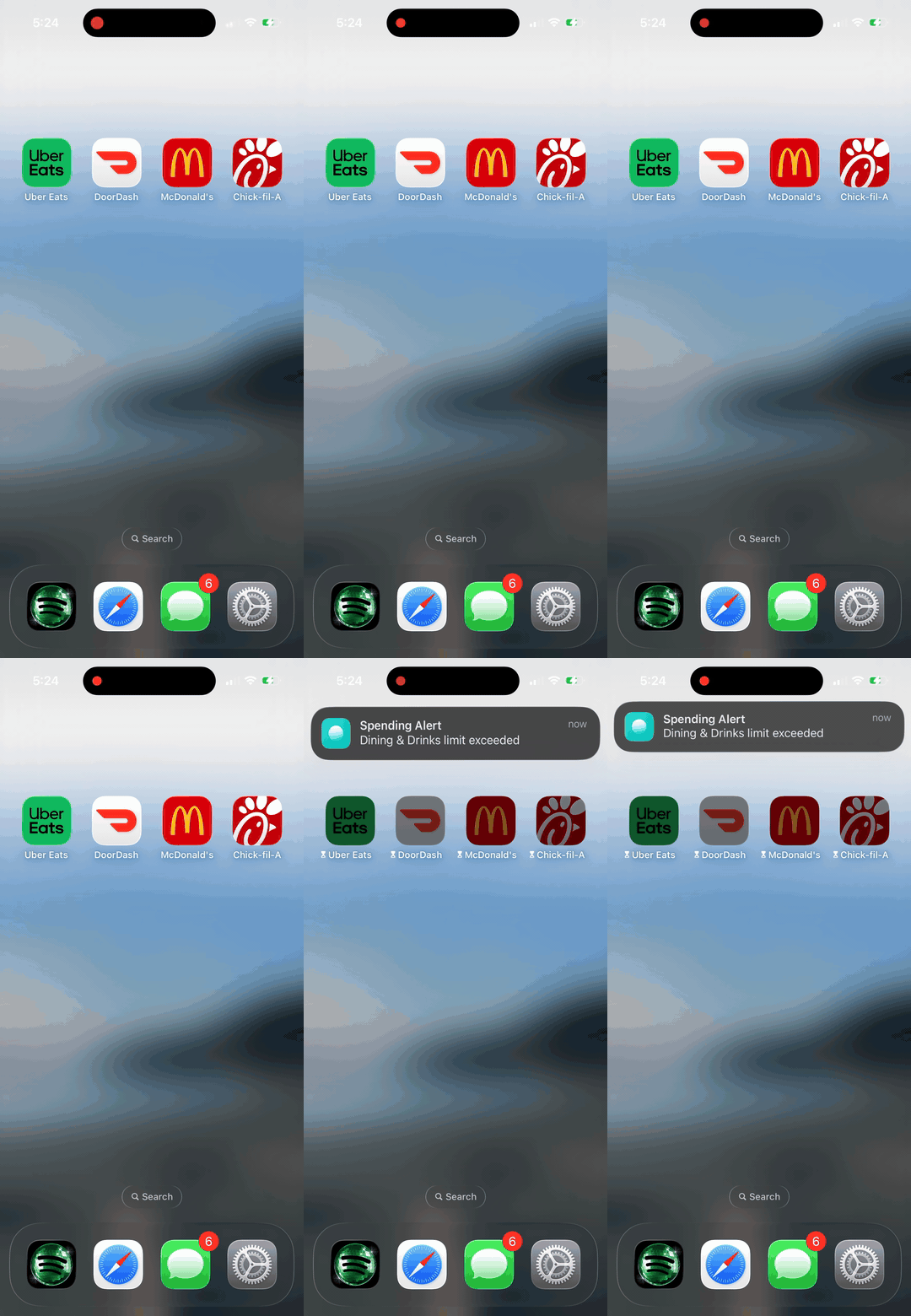
The Hinder block in action, the only behavior on this list that actually stops a purchase.
Why most budgeting apps fail you
Every budgeting app on the market does the same thing: it shows you a number. Some make the number pretty, some color-code it red, some send you a push notification when the number gets ugly. None of them stop you from making the number worse.
The dirty secret of the budgeting category is that most users churn within 90 days. Not because the apps are bad, most are excellent, but because dashboards do not change behavior. Watching your dining budget tick past zero on a Sunday night does not stop you from opening DoorDash on Monday at 6:42pm.
We graded these seven apps on one criterion above all others: can it actually stop a spend?
The verdict at a glance
| App | Best for | Price | Blocks spend? |
|---|---|---|---|
 Hinder Hinder | Impulse spenders who've tried tracking and given up | Free to download | Yes |
 YNAB YNAB | Spreadsheet brains who want to assign every dollar | $14.99/mo or $109/yr | No |
 Copilot Money Copilot Money | Design-conscious users who want a daily dashboard | $13/mo or $95/yr | No |
 Monarch Money Monarch Money | Households tracking multiple accounts together | $14.99/mo or $99/yr | No |
 Rocket Money Rocket Money | Cleaning up recurring charges in one weekend | Free tier; Premium $6-12/mo | Sort of |
 PocketGuard PocketGuard | Beginners who want one number, not 30 categories | Free tier; Plus $12.99/mo | No |
 Goodbudget Goodbudget | Cash-envelope diehards and privacy-first users | Free tier; Plus $10/mo | No |
Hinder- Best for
- Impulse spenders who've tried tracking and given up
- Price
- Free to download
YNAB- Best for
- Spreadsheet brains who want to assign every dollar
- Price
- $14.99/mo or $109/yr
Copilot Money- Best for
- Design-conscious users who want a daily dashboard
- Price
- $13/mo or $95/yr
Monarch Money- Best for
- Households tracking multiple accounts together
- Price
- $14.99/mo or $99/yr
Rocket Money- Best for
- Cleaning up recurring charges in one weekend
- Price
- Free tier; Premium $6-12/mo
PocketGuard- Best for
- Beginners who want one number, not 30 categories
- Price
- Free tier; Plus $12.99/mo
Goodbudget- Best for
- Cash-envelope diehards and privacy-first users
- Price
- Free tier; Plus $10/mo
1. Hinder: the only app that actually blocks the spend
Free to download · iPhone · Built on Plaid + iOS Screen Time
Hinder is the only budgeting app on this list that does something other apps physically cannot: when a Plaid-detected transaction pushes you past your budget, it freezes the apps where you spend. DoorDash will not open. Amazon will not load. Uber Eats becomes a blank screen until your next budget cycle or until you manually override (with friction).
The setup is two minutes: connect a bank, set a monthly budget, pick your Block List apps. That's it. The system runs in the background and you forget it exists, until the moment it saves you $40.
screenshot slot
Hinder home dashboard, remaining budget + Block List preview (phone screenshot, 1179x2556)
The catch: it's iPhone-only at launch and requires you to grant the iOS Screen Time permission. If you live in a budgeting spreadsheet and love categorizing every transaction, Hinder won't scratch that itch, it's deliberately one number, not thirty.
Best for: people who have tried YNAB, Mint, Copilot, and three Notion templates and still ended the month $200 over.
2. YNAB (You Need a Budget): the gold standard for active budgeters
$14.99/mo or $109/yr · iOS, Android, web
YNAB pioneered zero-based budgeting for software: every dollar you earn gets a job before you spend it. If you actually do the work, and YNAB is famous for the work, it changes how you think about money permanently.
The problem is that “the work” is real. YNAB expects you to open the app every few days, reconcile transactions, and re-allocate when you go over. People who stick with it are converts for life. People who don't stick with it are most people.
screenshot slot
YNAB category budget screen (App Store screenshot or press kit)
Blocks spending? No, but its philosophy of pre-assigning every dollar comes the closest to it psychologically.
Best for: people who genuinely enjoy budgeting and want a system to optimize.
3. Copilot Money: the prettiest tracker on iOS
$13/mo or $95/yr · iOS, macOS, Android
Copilot wins on aesthetics. Smooth animations, intelligent auto-categorization, and a dashboard that doesn't make you wince when you open it. If a budgeting app is going to live on your home screen, Copilot is the one you actually want there.
That said, it's a tracker. It tells you what happened, not what to do about it. The category overspend alerts are gentle nudges, not interventions.
screenshot slot
Copilot Money monthly overview (App Store screenshot)
Blocks spending? No.
Best for: people who want a daily dashboard that doesn't feel like homework.
4. Monarch Money: the credible Mint replacement
$14.99/mo or $99/yr · iOS, Android, web
When Mint shut down, Monarch absorbed most of its refugees for a reason. Net worth tracking, multiple-account aggregation, shared household budgeting, and Plaid connections that actually hold. It's the most comprehensive financial dashboard you can buy that isn't a brokerage.
screenshot slot
Monarch household / net worth dashboard (App Store or press kit)
Blocks spending? No.
Best for: couples merging finances, people with 6+ accounts to track, and Mint exiles.
5. Rocket Money: best in class for killing subscriptions
Free tier · Premium $6-12/mo · iOS, Android, web
Rocket Money (formerly Truebill) is the only app on this list that has a quasi-blocking feature: it can actively cancel subscriptions on your behalf. For one weekend of work it routinely saves users $20-50/mo in forgotten free trials and streaming services they don't use.
The day-to-day budgeting is thinner than YNAB or Monarch, and the upsells inside the app are aggressive. But for the subscription-killer use case alone, it's worth a download.
video slot
Rocket Money subscription cancel flow, short loop or screen recording (mp4, ~10s)
Blocks spending? Sort of, it can stop recurring charges, not impulse purchases.
Best for: the audit-your-subscriptions weekend, then keep it around as a watcher.
6. PocketGuard: one number, not thirty
Free tier · Plus $12.99/mo · iOS, Android
PocketGuard's pitch is “In My Pocket”, a single number showing what's safe to spend after bills, goals, and necessities are accounted for. It's the easiest app on this list to onboard and the hardest to misuse.
screenshot slot
PocketGuard 'In My Pocket' screen (App Store screenshot)
Blocks spending? No.
Best for: first-time budgeters who get overwhelmed by category-heavy apps.
7. Goodbudget: digital envelopes, no bank connection required
Free tier · Plus $10/mo · iOS, Android, web
The only app here that doesn't auto-sync with your bank. You enter transactions manually and assign them to virtual “envelopes.” That sounds tedious, but the act of typing in every purchase is itself a behavioral intervention , you have to look at the spend before you make it.
screenshot slot
Goodbudget envelopes view (App Store screenshot)
Blocks spending? No, but the manual entry creates more friction than any other tracker.
Best for: envelope-method loyalists and anyone who refuses to share bank credentials.
So which one should you pick?
Honestly, it depends on what kind of person you are:
- You love budgeting and want to optimize: YNAB.
- You want a beautiful daily dashboard: Copilot.
- You and your partner share finances: Monarch.
- You have too many subscriptions, Rocket Money for a weekend.
- You overspend no matter what app you try: Hinder.
Tracking apps are great if you're already disciplined. If you're not, no dashboard in the world is going to stop you from opening DoorDash on a Tuesday at 9pm, but an app that refuses to load will.
This is what “blocks spending” actually looks like.