
The best app to stop overspending in 2026 (alerts are not enough)
Your tracker already told you. You spent anyway. Here's the app that does something about it.
The best app to stop overspending is the one that enforces your limit, not the one with the best chart. Our pick is Hinder. It connects to your bank, warns you at 80% of a category budget, and locks the apps in that category at 100%. If you only need visibility, PocketGuard and YNAB are the best trackers.
What is the best app to stop overspending?
Hinder, if you're on iPhone and your problem is blowing through limits you already set. It's the only budgeting app we know of that does something when you hit 100%. Everything else on this page tells you about it.
That distinction matters more than any feature list. You searched for an app to stop overspending, not an app to show you overspending. You already have one of those. It's your bank app, and it has been showing you for years. The rest of this page is about why that split exists and which side of it you're on.
Why don't budgeting apps stop you from overspending?
Because they were never built to. Budgeting apps grew out of Mint and Quicken, and the job was accounting: pull in the transactions, sort them, draw a chart. Over the years they added goals, then alerts, then AI summaries. Nobody added a brake.
Think about what actually happens when you overspend in a tracker. You set Dining to $300. On the 19th you're at $312. YNAB turns the category red. PocketGuard drops your In My Pocket number. Monarch sends a push. Then you open DoorDash and order anyway, because the app that knows you're over has no connection to the app that's taking your money.
That's the gap. The limit lives in one app, the spending happens in another, and nothing bridges them. So the limit is a suggestion, and a suggestion at 9pm, hungry, with a saved card, loses every time. You don't lack discipline. A notification is just the weakest intervention there is.
What does an app need to actually stop overspending?
Four things. Miss any one and you're back to a tracker.
- A bank connection. Manual entry fails on exactly the purchases that matter, because the ones you don't want to log are the ones you're overspending on. The app has to see the transaction without asking you.
- A limit per category. Not one safe-to-spend number for everything. A separate ceiling for food delivery, for shopping, for whatever your leak is, so hitting one doesn't touch your groceries.
- An action at 100%. This is the one everybody skips. Something has to change in the world when you cross the line. Not a color. Not a badge. The place you spend has to get harder to reach.
- Friction on the override. If undoing the block takes one tap, it's a notification with extra steps. The way out should cost you a moment of honesty.
Apple's Screen Time is a useful test case. It will block an app for you, but by time, not money. It has no idea what you spent. And unless you set a passcode and turn on Block at End of Limit, the limit screen offers One More Minute, Remind Me in 15 Minutes, and Ignore Limit for Today. That's point four failing on its own.
Can alerts alone stop overspending?
For some people, yes. If you've never seen your real numbers, the first month on PocketGuard or YNAB is a genuine shock, and shock changes behavior. That's not nothing.
But you're probably past that stage. You know the number. You get the alert. You've gotten the alert dozens of times. It used to sting. Now you swipe it away without reading it. Alerts decay. Enforcement doesn't.
 HinderHinderYes, through Plaid or manual entryHinderPush alert at 80%HinderLocks every app in the categoryHinderA block screen. Five-minute pass, or raise the limit yourselfHinderYou choose, on purpose, with the app closed
The first two rows are a tie. The good trackers know your real spending and warn you before the line. The whole separation is in what happens after.
 How Hinder stops overspending before the next purchase
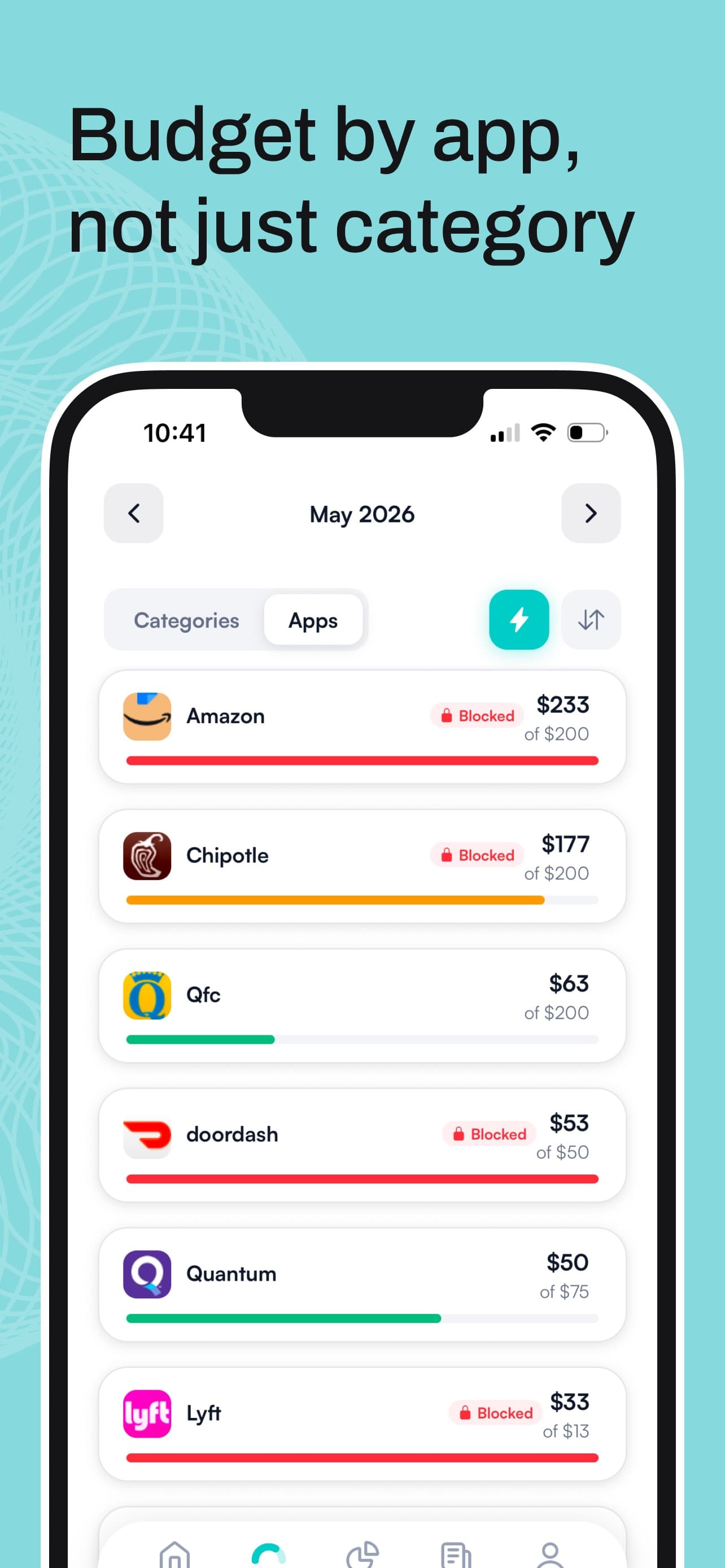
Hinder starts like a tracker. You connect your bank and cards through Plaid, or log transactions by hand, and you create categories that match where your money actually goes. Then you give each category a monthly limit and pick the apps that belong to it. Food delivery gets DoorDash, Uber Eats, Grubhub and Instacart. Shopping gets Amazon, Temu, Target, and whatever else you'd rather not be able to open at midnight.
At 80% of a limit you get a push alert. Same as any tracker, and often enough on its own.
At 100%, Hinder uses iOS Screen Time to lock every app in that category. Not a reminder. A block screen, on the app itself, that won't go away. Blow your food delivery budget and all four delivery apps lock at the same time, so you can't dodge the DoorDash block by opening Uber Eats.
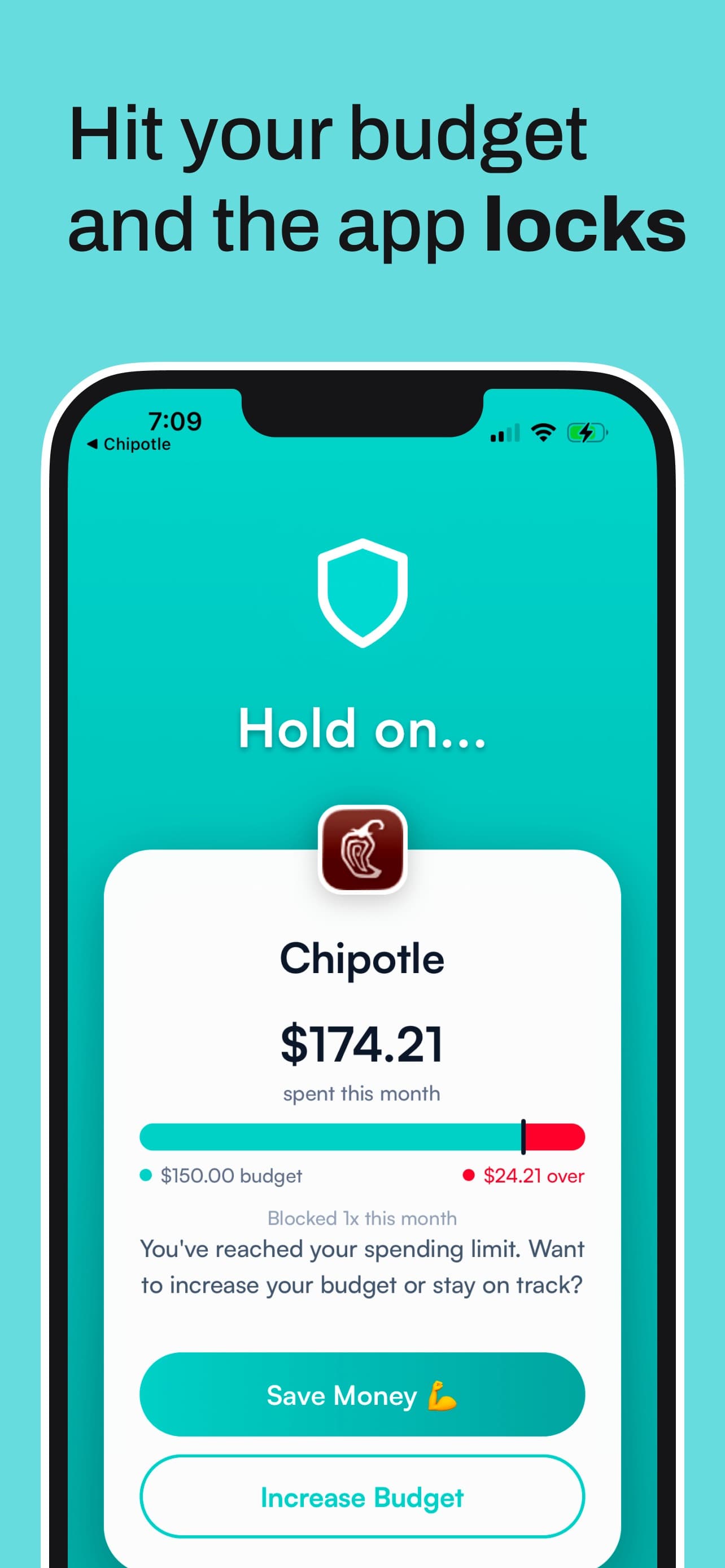
The block screen gives you two buttons: Save Money, or Increase Budget. You can take a temporary unblock that lasts about five minutes, enough to finish something real and not enough to browse. The actual way out is to raise the limit, on purpose, with your own thumb. Most people can't quite bring themselves to do it for a $38 burrito order, which is the entire point.
You can also put a limit on a single app instead of a whole category. If Amazon is your only problem, give Amazon its own ceiling and leave the rest of your shopping alone.


Hinder also keeps a no-spend streak per app with estimated savings, plus the usual spending charts. What it skips on purpose: net worth, investments, credit scores, subscription cancelling. It isn't trying to be your whole financial life. It's trying to stop the spend.
A few honest limits. It's iPhone only, iOS 16 or later, because the blocking runs on Screen Time, so there's no Android or web version. It's single user, so no household budgets. It's free to download with a free trial, and a subscription after that. No ads, and it never sells your data.
The best budgeting apps for overspenders, compared
| App | At your limit | Bank sync | Price | Platform |
|---|---|---|---|---|
| Hinder | Locks the apps in that category | Yes, via Plaid | Free to try | iPhone |
 PocketGuard PocketGuard | Alert as you get close; In My Pocket number drops | Yes | 7-day trial; $12.99/mo or $74.99/yr | iPhone, Android, web |
 YNAB YNAB | Category turns red; you cover it from another one | Yes | 34-day trial; $14.99/mo or $109/yr | iPhone, Android, web |
 Monarch Monarch | Configurable alerts by category | Yes | First week free; $99.99/yr | iPhone, Android, web |
 Rocket Money Rocket Money | Alert as a category nears its limit | Yes | Free tier; Premium ~$7 to $14/mo | iPhone, Android, web |
Hinder- At your limit
- Locks the apps in that category
- Bank sync
- Yes, via Plaid
- Price
- Free to try
PocketGuard- At your limit
- Alert as you get close; In My Pocket number drops
- Bank sync
- Yes
- Price
- 7-day trial; $12.99/mo or $74.99/yr
YNAB- At your limit
- Category turns red; you cover it from another one
- Bank sync
- Yes
- Price
- 34-day trial; $14.99/mo or $109/yr
Monarch- At your limit
- Configurable alerts by category
- Bank sync
- Yes
- Price
- First week free; $99.99/yr
Rocket Money- At your limit
- Alert as a category nears its limit
- Bank sync
- Yes
- Price
- Free tier; Premium ~$7 to $14/mo
PocketGuard is the best tracker for someone who wants one number. In My Pocket tells you what's safe to spend after bills and goals, and it pings you as you get close to a limit. It can't stop you spending it, which is the whole story of PocketGuard vs Hinder. $12.99 a month or $74.99 a year after a 7-day trial. The old free tier is gone from the pricing page.
YNAB is the best plan. Every dollar gets a job, overspent categories turn red, and you're expected to move money to cover them. It's the most honest relationship with your money an app can give you, and it still can't lock DoorDash. We went deep on that in YNAB vs Hinder. $14.99 a month or $109 a year, 34-day trial.
Monarch is the best whole-life dashboard, with budget alerts you can tune by category. $99.99 a year. Rocket Money is really a subscription-cancelling app that also budgets, and it will warn you as a category nears its limit. The free tier covers a few budgets; Premium is pay-what-you-want, roughly $7 to $14 a month.
Two more worth a line. Goodbudget's envelopes are the closest a tracker gets to a real limit, because an empty envelope feels empty, but bank sync costs $10 a month or $80 a year and the envelope can't lock anything. Copilot is the best-looking of the bunch and now runs on the web as well as iPhone and Mac, $13 a month or $95 a year. Still a tracker.
For the full scored roundup, see our review of seven budgeting apps on whether they stop overspending. If your problem is impulse buys rather than category limits, the list of apps that stop you from spending money covers blockers, cooldowns and timers too.
How to set it up in two minutes
- Download Hinder on your iPhone and connect your bank through Plaid. Several institutions are fine, and you can add transactions by hand too.
- Create a category for your leak. Food delivery, shopping, whatever shows up most on your statement.
- Set a monthly limit. Pick a number you'd be proud of, not a fantasy. You can raise it later, which is exactly the friction you want.
- Add the apps that belong to that category and grant the Screen Time permission when asked. Here's the walkthrough.
- Go live your life. At 80% you get a nudge. At 100% the apps lock.
That's it. There's no step where you review a chart.
Common questions
Is there an app that actually stops you from overspending?
Yes. Hinder connects to your bank, tracks spending against the category limits you set, and locks the apps in that category with iOS Screen Time the moment you hit 100%. Trackers like PocketGuard and YNAB warn you. Hinder is the one that acts.
Why do I keep overspending even with a budgeting app?
Because the budget lives in one app and the spending happens in another, and nothing connects them. A tracker can turn a category red or send a push, but DoorDash and Amazon still open. Alerts also wear off. After a few dozen, you swipe them away without reading.
Is PocketGuard or YNAB better for overspending?
YNAB if you want the deeper plan and will put in the time. PocketGuard if you want one safe-to-spend number and a quick heads-up. Both are trackers, though. If you already know the number and blow past it anyway, neither one stops the next purchase. That is what Hinder is for.
Can Apple Screen Time stop me from overspending?
Only by the clock. Screen Time can cap an app at an hour a day, but it has no idea what you spent, and the default limit screen offers One More Minute and Ignore Limit for Today. Hinder uses the same Screen Time blocking but triggers it from your real bank transactions instead.
What happens when I hit my budget in Hinder?
Every app in that category locks behind a block screen with two choices: Save Money or Increase Budget. You can take a temporary unblock of about five minutes, but the only real way back in is to raise the limit yourself. Under budget, nothing is locked at all.