
The best app to stop spending money (2026)
Trackers show you the damage afterward. The pick here gets in the way first.
The best app to stop spending money is Hinder. It connects to your bank, watches what you actually spend, and locks DoorDash, Amazon, or whatever you overspend in the moment you hit your limit. Everything else blocks on a clock or a timer. If you're on Android or want free, the runners-up are below.
What is the best app to stop spending money?
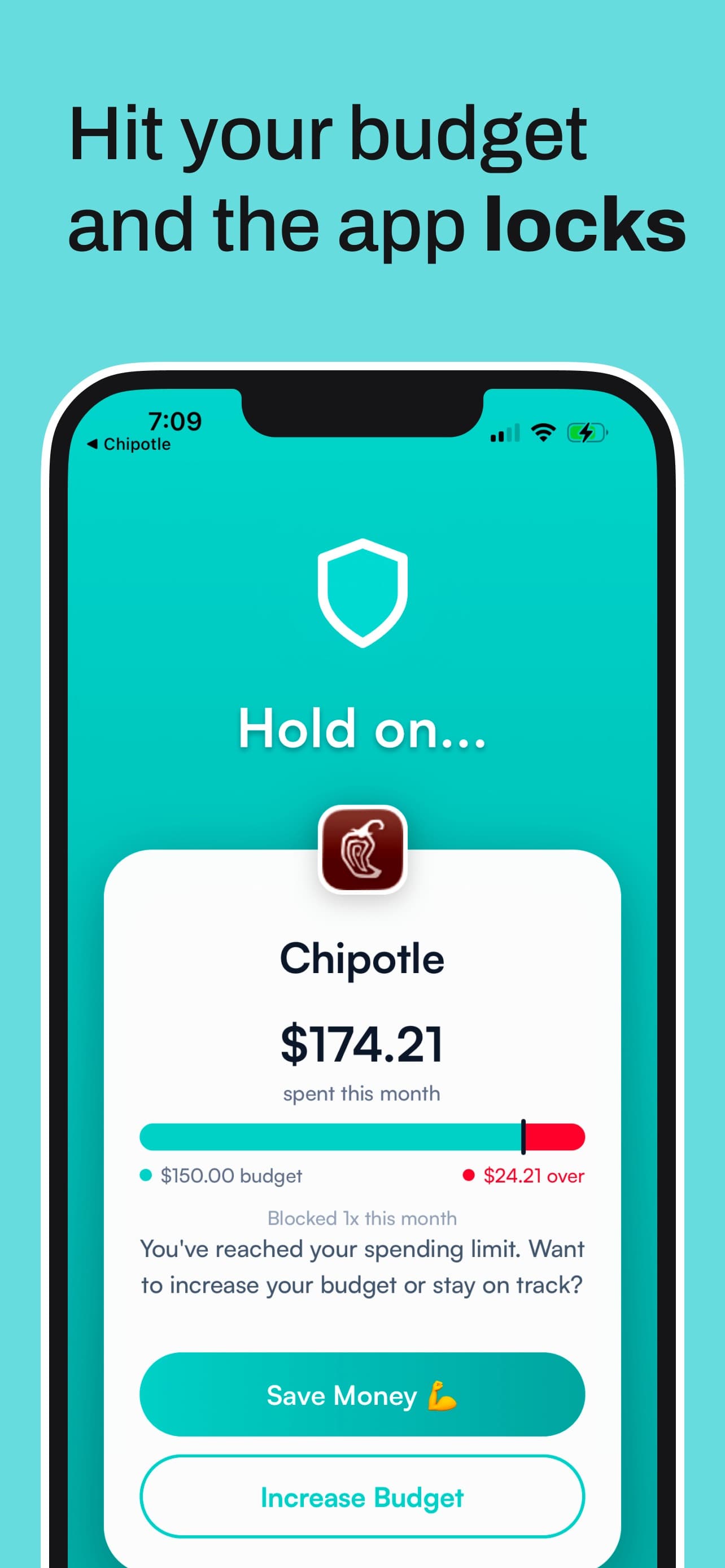
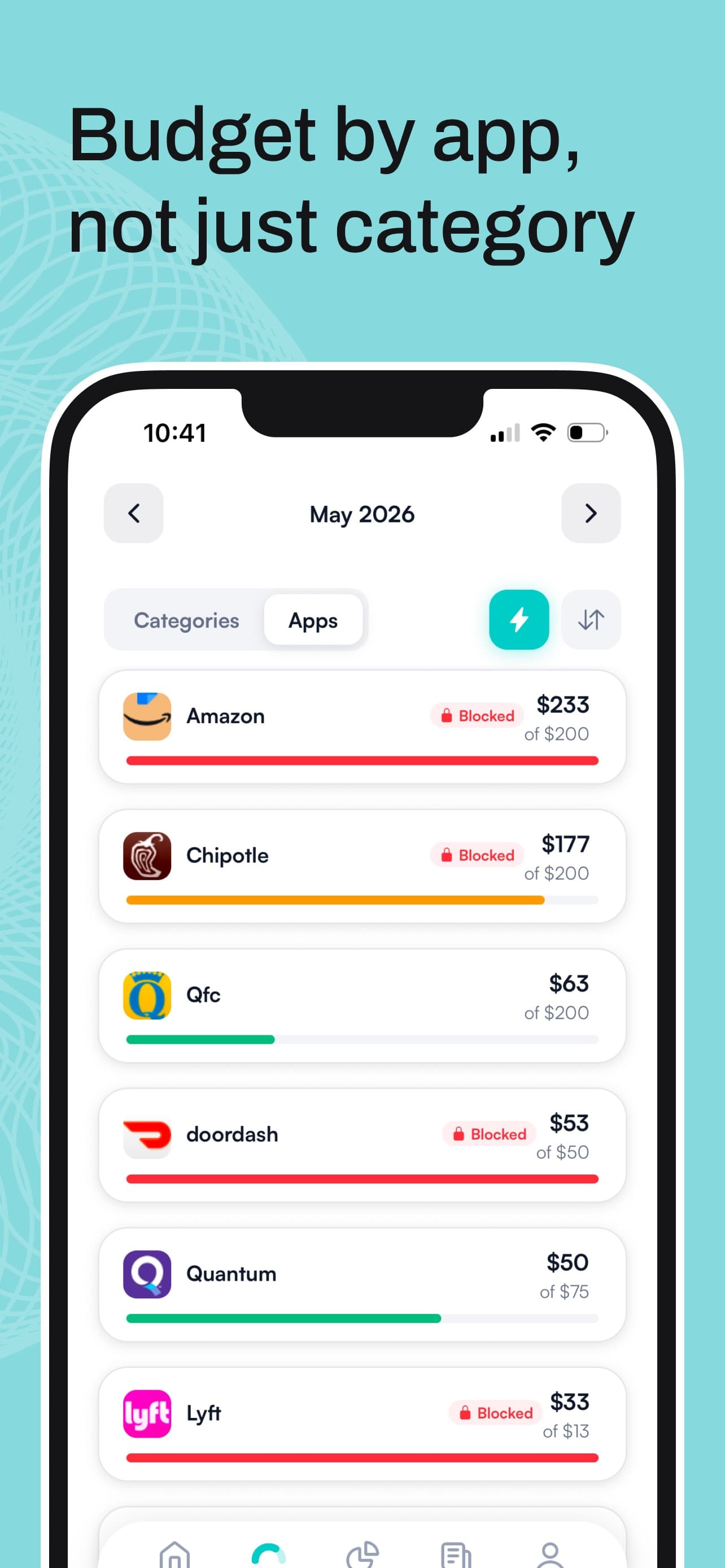
Hinder, and the reason is short. Every other app in this category asks you to predict when you'll be weak. Pick a schedule, set a timer, take a breath. Hinder doesn't guess. It connects to your bank and card accounts through Plaid, you set a monthly limit per category or per app, and when real transactions cross that limit it uses iOS Screen Time to lock the apps. Not a nag. A wall.
That's the whole difference. A tracker tells you on the 23rd that you spent $340 on delivery. Hinder tells you at 80% that you're close, and at 100% DoorDash stops opening. A money problem gets a money trigger, which sounds obvious until you notice nobody else does it. We ranked the full field in our list of apps that stop you from spending money. This page is the short answer.
It's iPhone only (iOS 16 and up), free to download with a free trial, then a subscription. The gaps, since you'll find them anyway: no Android, no shared budgets for a household, and it won't track net worth or cancel subscriptions. It stops the spend. That's the job.
How does an app actually stop you from spending?
Three kinds of friction exist, and only one of them knows your balance.
A pause. one sec makes you sit through a breathing animation before the app opens, then asks if you still want in. It works more often than you'd expect. It also works exactly the same at $0 spent and at $600 spent.
A clock. Freedom, AppBlock, and Shop Locked lock apps during hours you choose. Good for the 11pm Amazon scroll. Useless for the Saturday afternoon one, because a schedule doesn't know you already blew the budget on Tuesday.
A limit. Hinder reads your transactions, sends a push alert at 80% of the limit, and at 100% the block lands. Blow a category budget and every app in that category locks at once, so going over on food delivery freezes DoorDash and Uber Eats together. The block screen offers two buttons, Save Money or Increase Budget. A temporary unblock buys you about five minutes. The real way out is raising the limit, on purpose, with your own thumb, which feels nothing like tapping Ignore.
Which app is best if your problem is online shopping?
Still Hinder, with one honest caveat. Shopping is where per-app limits earn their keep. Give Amazon $150 a month and Temu $0, and Temu is locked from the first of the month while Amazon stays open until the $150 is gone. TikTok Shop gets the same treatment, which matters because that checkout lives inside an app you open for other reasons. The specifics are in our guides to blocking Amazon on iPhone and stopping TikTok Shop impulse buys.


The caveat: Hinder locks apps on your phone. If most of your shopping happens in a browser on a laptop, Freedom's site blocking on Mac and Windows covers that better. If your problem isn't volume but the one $200 thing you'll regret, CartPause is built for exactly that. And Shop Locked takes a third route, shopping hours you pick with everything locked outside them, at $3.99 a week after a three-day trial, which adds up faster than most of the carts it saves you from.
The runners-up, by what you need
If Hinder is wrong for you, one of these is probably right. Each is good at a narrower job.
 one sec
Best free app to stop spending money. Free for one app, forever. Put it on the app that hurts most and every open starts with a slow breath and a question. In a six-week study published in PNAS with 280 participants, opens of the targeted apps dropped 57%. Pro covers more apps for $19.99 a year. iPhone, Android, and Mac.
 CartPause
Best for online shopping cooldowns. Share any product from any store into CartPause and a 72-hour timer starts (48 or 24 if you're impatient). When it ends you decide with a clear head, and usually you pass. Unlimited pauses are free; Pro adds a running savings total and weekly insights for $1.99 a month. iPhone, iOS 18.6 or later.
 AppBlock
Best for Android. Hinder doesn't exist on Android, so AppBlock is the pick. It blocks apps and sites on a schedule, by location, or when you join a Wi-Fi network, so Shein can go dark the moment you get home to the couch. Free for two schedules; Premium is $4.99 a month or $29.99 a year.
 Freedom
Best for blocking on every device at once. Sessions sync across iPhone, Android, Mac, and Windows, and Locked Mode stops you from quitting a session early. The free plan blocks but can't schedule; Premium is $3.33 a month billed yearly.
 YNAB
YNAB
Best if you need a budget plan first. If you don't have a budget yet, blocking is premature. YNAB makes you give every dollar a job before the month starts, and the method sticks for people who show up for it. $14.99 a month or $109 a year after a 34-day trial, and it will never lock an app. YNAB vs Hinder covers when you'd want both, and our roundup of the best budgeting apps for iPhone has the rest of the planners.
Every app at a glance
| App | What triggers the block | Platforms | Free tier |
|---|---|---|---|
 Hinder Hinder | Your real spending crossing the limit you set | iPhone | Free trial |
 one sec one sec | Every open, a forced breath first | iPhone, Android, Mac | One app free |
 CartPause CartPause | A 24 to 72 hour timer per item | iPhone | Unlimited pauses |
 AppBlock AppBlock | A schedule, a location, or a Wi-Fi network | iPhone, Android | 2 schedules |
 Freedom Freedom | A session you start or schedule | iPhone, Android, Mac, Windows | No scheduling |
 Shop Locked Shop Locked | Any time outside your shopping window | iPhone | 3-day trial |
 YNAB YNAB | Nothing, it plans and tracks | iPhone, Android, web | 34-day trial |
 Cleo Cleo | Nothing, it roasts you | iPhone, Android | Roast mode free |
Hinder- What triggers the block
- Your real spending crossing the limit you set
- Platforms
- iPhone
one sec- What triggers the block
- Every open, a forced breath first
- Platforms
- iPhone, Android, Mac
CartPause- What triggers the block
- A 24 to 72 hour timer per item
- Platforms
- iPhone
AppBlock- What triggers the block
- A schedule, a location, or a Wi-Fi network
- Platforms
- iPhone, Android
Freedom- What triggers the block
- A session you start or schedule
- Platforms
- iPhone, Android, Mac, Windows
Shop Locked- What triggers the block
- Any time outside your shopping window
- Platforms
- iPhone
YNAB- What triggers the block
- Nothing, it plans and tracks
- Platforms
- iPhone, Android, web
Cleo- What triggers the block
- Nothing, it roasts you
- Platforms
- iPhone, Android
Is there a free app to stop spending money?
Yes, with limits that matter. one sec is free for one app, which is enough if your problem has a single name. CartPause gives you unlimited pauses for free. Freedom and AppBlock both have free tiers that block but barely schedule. Cleo's roast mode is free and will read your week in delivery orders back to you with real contempt, though it can't lock anything.
Hinder is free to download and the trial is free, but using it past that takes a subscription. That's the cost of the bank connection and the thing it makes possible: a block that only fires when your money says so. If a free timer would have fixed you, it probably already would have.
Can you just use Screen Time instead?
You can try, and most people have. Two problems. First, App Limits are time-based, so a 30-minute Amazon limit does nothing about a two-minute, $180 order. Second, when the limit hits, iOS offers Ignore Limit with three choices: One More Minute, Remind Me in 15 Minutes, and Ignore Limit for Today. One tap and you're through. You can hide that with a Screen Time passcode and Block at End of Limit, but you're the one who set the passcode, and you know it.
Hinder uses the same Screen Time machinery underneath. The difference is what fires it (your spending against your limit, not minutes on a timer) and what clears it (a deliberate budget change, not a tap).
How to set it up in two minutes
- Connect a bank or card. Download Hinder on iPhone and link your accounts through Plaid. More than one institution is fine.
- Set a limit. Create a category for your leak (Food delivery, Shopping, Coffee) with a monthly number. Add a per-app limit for the worst offender if one app deserves it.
- Pick the apps to block. Choose the apps that lock when the limit hits and approve the Screen Time permission. Our walkthrough on adding apps to block has the screenshots.
- Live normally. Under budget, nothing is locked. At 80% you get a push. At 100% the apps stop opening for the rest of the month, or until you raise the limit on purpose.
Common questions
Is there an app that stops you from spending money?
Yes. Hinder connects to your bank, tracks spending against the monthly limits you set, and uses iOS Screen Time to lock the apps you overspend in once you cross a limit. Blockers like Freedom and AppBlock lock apps on a schedule instead, which has no idea how much you've spent.
What is the best free app to stop spending money?
one sec, if one app is your problem. It's free for a single app forever and makes you take a breath before that app opens. CartPause is free with unlimited pauses for online purchases. Hinder is free to download with a free trial, then needs a subscription.
Does an app that blocks spending work on Android?
Hinder is iPhone only because it blocks through iOS Screen Time. On Android, AppBlock is the closest thing, with schedule and location-based blocking for shopping and delivery apps. one sec, Freedom, and Cleo also run on Android, though none of them block based on money spent.
Can an app really lock Amazon or DoorDash?
Yes. On iPhone, an app with Screen Time permission can put a block screen in front of any other app. Hinder does it automatically when your shopping or delivery spending crosses the limit you set, and the lock lifts when you raise the limit, not when you tap through.
Why doesn't my budgeting app stop me from spending?
Because it was built to track, not enforce. YNAB, Monarch, and Copilot show you the overspend after it happens. A spending blocker like Hinder acts at the limit, which is the only moment that matters when the DoorDash urge hits at 9pm.