Which budgeting apps alert you before you go over your spending limit?
Most budget alerts arrive after the money is gone. Here's which apps warn you first, how early, and what happens next.
The budgeting apps that alert you before you go over a spending limit are Hinder, PocketGuard, Rocket Money, and Quicken Simplifi. Hinder warns at 80% of a budget, then locks your spending apps at 100%. PocketGuard, Rocket Money, and Simplifi warn as you approach a limit. YNAB, Monarch Money, and Copilot Money mostly notify you after you're already over.
Budget alert apps compared
Every row below comes from the company's own help docs or feature pages, checked in October 2026. "How early" means how much warning you get before the limit, not how fast the bank sync is.
| App | What triggers the alert | How early | After you go over | Platforms |
|---|---|---|---|---|
 Hinder Hinder | Spending hits 80% of a category or per-app limit | At 80% | Connected spending apps lock via Screen Time | iPhone (iOS 16+) |
 PocketGuard PocketGuard | Approaching or exceeding a category limit; Pace flags spending faster than plan | Before the limit | Over-budget notification | iPhone, Android, web |
 Rocket Money Rocket Money | Approaching a category spending limit | Before the limit | Notification only | iPhone, Android, web |
 Quicken Simplifi Quicken Simplifi | A Spending Watchlist nearing or reaching its target | Before the target | Notification only | iPhone, Android, web |
 Monarch Money Monarch Money | Budget Exceeded toggle for a category | None, fires once over | Notification only | iPhone, Android, web |
 Copilot Money Copilot Money | Budget update when a category goes over | None, fires once over | Notification only | iPhone, iPad, Mac, web |
 YNAB YNAB | A transaction causes cash overspending | None, fires once over | Notification and an overspent banner | iPhone, Android, web |
 EveryDollar EveryDollar | Weekly reminder to track transactions | No budget threshold alert | Nothing automatic | iPhone, Android, web |
| Your bank | A single charge above an amount you pick | Per purchase, not per budget | Nothing, it doesn't know your budget | Your bank's app |
Hinder- What triggers the alert
- Spending hits 80% of a category or per-app limit
- How early
- At 80%
- After you go over
- Connected spending apps lock via Screen Time
PocketGuard- What triggers the alert
- Approaching or exceeding a category limit; Pace flags spending faster than plan
- How early
- Before the limit
- After you go over
- Over-budget notification
Rocket Money- What triggers the alert
- Approaching a category spending limit
- How early
- Before the limit
- After you go over
- Notification only
Quicken Simplifi- What triggers the alert
- A Spending Watchlist nearing or reaching its target
- How early
- Before the target
- After you go over
- Notification only
Monarch Money- What triggers the alert
- Budget Exceeded toggle for a category
- How early
- None, fires once over
- After you go over
- Notification only
Copilot Money- What triggers the alert
- Budget update when a category goes over
- How early
- None, fires once over
- After you go over
- Notification only
YNAB- What triggers the alert
- A transaction causes cash overspending
- How early
- None, fires once over
- After you go over
- Notification and an overspent banner
EveryDollar- What triggers the alert
- Weekly reminder to track transactions
- How early
- No budget threshold alert
- After you go over
- Nothing automatic
- What triggers the alert
- A single charge above an amount you pick
- How early
- Per purchase, not per budget
- After you go over
- Nothing, it doesn't know your budget
Read the fourth column twice. Every app except one does the same thing after you cross the line: it sends another notification. That's the gap this whole question is really about.
Which budgeting app warns you before you overspend?
Hinder gives the clearest early warning, a push at 80% of any limit you set, and it's the only one that follows the warning with a hard stop.
You connect your bank and cards through Plaid (or add transactions by hand), then set monthly limits by category or per app. Food delivery gets $200. Amazon gets $150. Temu gets $0. When real transactions push a limit to 80%, you get the alert. When they hit 100%, Hinder uses iOS Screen Time to lock the apps tied to that budget. Blow the food delivery category and DoorDash, Uber Eats, and Grubhub all lock at once.
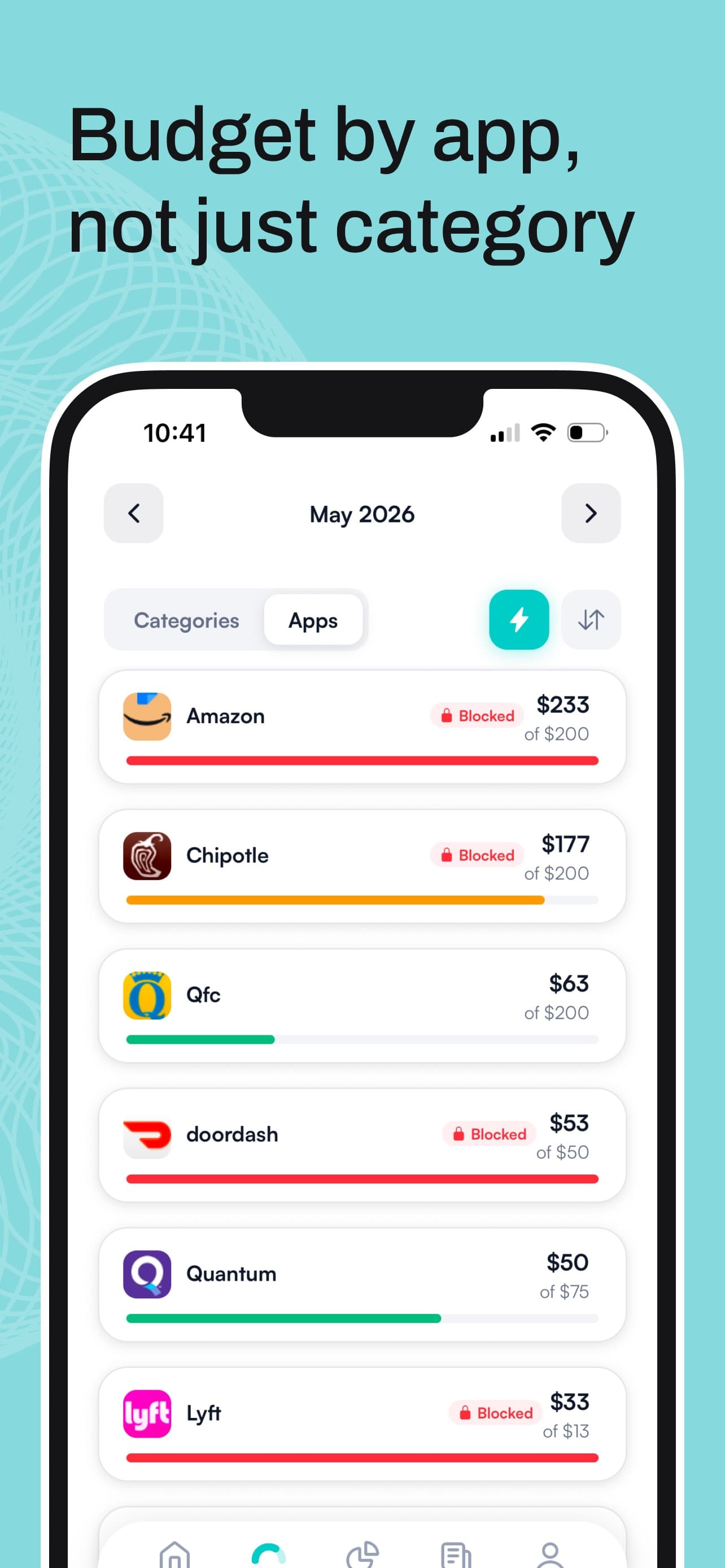
The 80% number matters more than it looks. At 50% you shrug. At 100% it's too late. At 80% you still have a fifth of the budget and usually a week or more of the month, which is exactly when changing course is cheap. If you want the full case for limits that enforce themselves, we broke it down in automated budget enforcement tools.
Which other apps send a warning before the limit?
Three more apps alert you while there's still room left. None of them do anything beyond that.
 PocketGuard
PocketGuard says it notifies you "whenever you're approaching or exceeding your limit in any spending category." In 2026 it added Pace, which compares what you've spent so far, the days left, and your last six months of habits, then warns you when you're on track to blow the month. That's the smartest forecast in the group. Pace launched on iOS first.
 Rocket Money
Rocket Money's budget page promises alerts when you're approaching your spending targets in a category. It also does low balance alerts with custom thresholds per account. Basic budgeting is on the free tier; extra categories and tags need Premium.
 Quicken Simplifi
Simplifi's early warning lives in Spending Watchlists, not the main spending plan. Build a watchlist for a category, merchant, or tag, give it a monthly target, and turn on notifications to get an alert as you approach or reach it. Easy to miss in setup, so go turn it on.
Can YNAB send alerts when you're close to your budget?
No, YNAB doesn't have a built-in "you're close" alert; it notifies you once a transaction has caused overspending.
YNAB's own notification guide lists the triggers: new transactions to import or approve, income arriving, a transaction that "caused cash overspending in your plan," and account connection issues. On iPhone, a banner showing your count of overspent categories sits at the top of the Home and Plan tabs. All of that is after the fact.
If you love YNAB and want an earlier nudge, IFTTT and Zapier both have YNAB connectors that can text or email you, but you're building plumbing for a feature the app doesn't ship. YNAB is a great plan. It isn't a guardrail. Our roundup of the best budgeting apps for 2026 covers where it wins.
Does Monarch Money have budget alerts?
Yes, but Monarch's budget alert fires when you exceed a category, not before.
In Settings, then Notifications, there's a Budget Exceeded toggle. Turn it on and Monarch pings you when a category goes over. You can also set alerts for transactions above a dollar amount and reminders for upcoming bills. Useful, and nicely done, but there's no percentage warning on the way up.
Does Copilot Money warn you before you go over budget?
Copilot's documented budget alert, "Budgets updates," fires when you go over budget in a category.
Its settings guide also lists a weekly Monday spending recap and a low balance alert when checking or savings drops below $100. Good app, great design, iPhone and Mac first. The warning still shows up once the line is already behind you.
Does EveryDollar send overspending alerts?
Not that Ramsey documents; EveryDollar's push notification is a weekly reminder to track your transactions.
The help center describes it as a Tuesday morning reminder. That's a habit nudge, not a budget alert. If you budget in EveryDollar, you'll need to open the app to see a line going red.
Is there an app that stops you after you go over budget?
Yes, Hinder is the only budgeting app here that blocks spending at the limit instead of sending another notification.
Here's why that matters. You got the 80% warning. You read it. It's 9pm, you're tired, and DoorDash is one tap away. A second notification at 100% changes nothing. A locked app does.
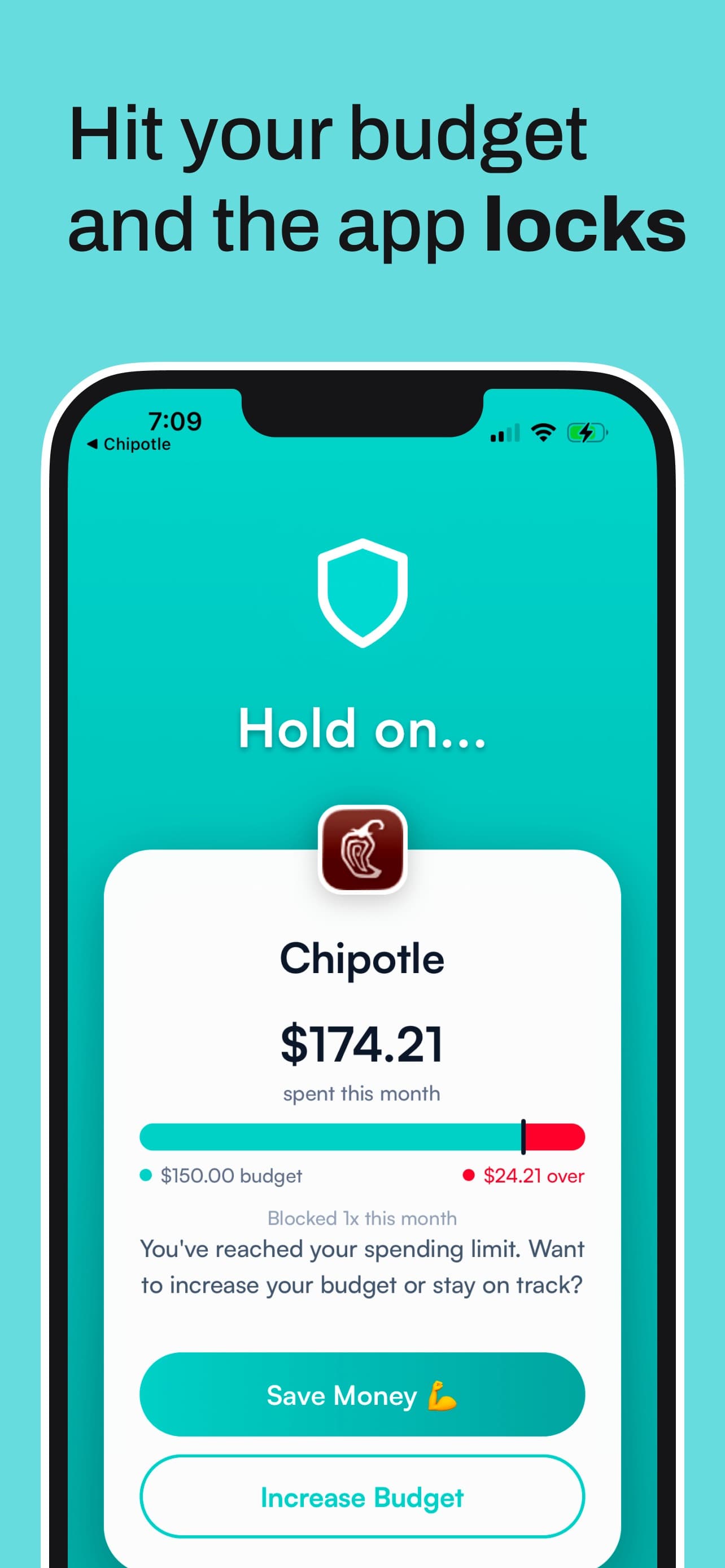
When a Hinder budget hits 100%, the connected apps show a block screen with two buttons, Save Money and Increase Budget. You can grab a temporary unblock for about five minutes if you genuinely need to check an order. To really get back in, you raise the limit yourself, on purpose, which is a very different feeling from swiping away an alert. Per-app no-spend streaks track how long you've kept your hands off.


We compared every app that does something like this, budget based or not, in apps that stop you from spending money.
How do I get a notification before I overspend on my iPhone?
Install a budgeting app with a pre-limit alert, set a monthly limit for the category you overspend in, and allow notifications.
- Pick an app with a warning before the limit. Hinder, PocketGuard, Rocket Money, or Simplifi. If you also want the apps to lock at 100%, it has to be Hinder.
- Connect your bank and cards. All four sync transactions automatically. Hinder uses Plaid and lets you add cash purchases by hand.
- Set one limit for your actual leak. Not twelve categories. The one that hurts, like food delivery or online shopping, with a real monthly number.
- Allow notifications in iOS Settings. Check Settings, then Notifications, then the app. An alert that iOS silences is no alert at all.
- Add your bank's card alerts too. Most banks, Chase included, let you get a push for any charge over an amount you choose. It knows nothing about your budget, but it's often the fastest ping for a single big purchase.
More on building the habit around the alert in our guide to an app to stop overspending.
Why do budget alerts sometimes arrive late?
Because every budgeting app waits on your bank to report the transaction before it can count it.
Hinder, like the rest, reads transactions through a bank data connection. A tap at a coffee shop might show up in minutes or in a few hours, and some banks hold pending charges back longer. So an 80% alert or a 100% lock lands when the purchase syncs, not the second your card is swiped. Set your limits with a little cushion and you won't notice.
What Hinder doesn't do
It's iPhone only, iOS 16 or later, with no Android or web version. There are no shared household budgets, no net worth tracking, and it won't cancel subscriptions for you. It's free to download with a one-week free trial, then a subscription. If you need Android, PocketGuard or Rocket Money gives you the early warning without the lock.
Common questions
What budgeting apps send you alerts before you go over your spending limits?
Hinder, PocketGuard, Rocket Money, and Quicken Simplifi all send a warning while you still have money left in a budget. Hinder alerts at 80% of a limit, PocketGuard and Rocket Money alert as you approach a category limit, and Simplifi alerts as a Spending Watchlist nears its target. YNAB, Monarch, and Copilot notify you once a category is already over.
Is there a budgeting app that alerts me at 80% of my budget?
Yes. Hinder sends a push notification when your spending reaches 80% of any category or per-app limit you set, then locks the connected spending apps through iOS Screen Time when you reach 100%. It's iPhone only, iOS 16 or later.
Can YNAB warn me before I overspend a category?
Not natively. YNAB's own notification guide lists an alert when a transaction causes cash overspending, which fires after the fact. To get a heads-up earlier you'd need an outside automation through IFTTT or Zapier, or a different app.
Which app actually stops me from spending after I go over budget?
Hinder is the only budgeting app here that does something at the limit besides notify you. When a category budget hits 100%, every connected app in that category locks via iOS Screen Time. You can take a temporary unblock of about five minutes, but the real way out is raising the limit on purpose.
Are budget alerts in these apps real-time?
Close, not instant. Every app on this list reads transactions from your bank through a data connection, so an alert can only fire once the purchase syncs. That's usually minutes to hours, and pending charges at some banks take longer. Your bank's own card alerts are often the fastest signal for a single purchase.