Can I set a spending limit on my debit card?
Sort of. Your bank will let you shrink the daily ceiling and lock the card. A real monthly budget cap takes a different tool.
Yes, but probably not the kind of limit you want. Most big banks let you lower your daily debit purchase limit, lock the card, and set alerts for charges over an amount. Very few let you cap spending per month. For that, use a virtual card with a monthly limit, a prepaid card, or cash envelopes.
Your options for limiting debit card spending, compared
We checked each bank and product against its own help pages in October 2026. Features change, and limits vary by account, so treat this as a map and confirm in your own app.
| Option | What it limits | Monthly cap? | Good for |
|---|---|---|---|
| Lower your daily purchase limit | Total card purchases per day | No | Capping one bad day |
| Card lock and alerts | New purchases while locked; pings above an amount | No | A pause button and awareness |
| Virtual card (Privacy.com) | One card, per transaction, month, year, or total | Yes, per card | Online shopping and subscriptions |
| Family card (Greenlight, Chase First) | Amount per store or category, set by a parent | Yes, by what you load | Kids and teens |
| Prepaid card or cash envelopes | Whatever you put on it | Yes, by refilling monthly | Hard stop on in-person spending |
 Hinder Hinder | Access to the apps you overspend in, once a budget is spent | Yes, by category or app | Phone spending: delivery, shopping, impulse buys |
- What it limits
- Total card purchases per day
- Monthly cap?
- No
- What it limits
- New purchases while locked; pings above an amount
- Monthly cap?
- No
- What it limits
- One card, per transaction, month, year, or total
- Monthly cap?
- Yes, per card
- What it limits
- Amount per store or category, set by a parent
- Monthly cap?
- Yes, by what you load
- What it limits
- Whatever you put on it
- Monthly cap?
- Yes, by refilling monthly
Hinder- What it limits
- Access to the apps you overspend in, once a budget is spent
- Monthly cap?
- Yes, by category or app
Notice what's missing. No regular bank debit card on this list will stop you at $300 of restaurants for the month. Banks think about limits as fraud protection. You're thinking about them as a budget. Those are different jobs.
Can you lower your debit card's daily limit?
At most big banks, yes, though some make you call instead of tapping a button.
Every debit card already has a daily purchase limit. The bank sets it, and the number depends on your account type. You can usually ask for a lower one, which is the closest thing a bank offers to a spending limit.
- Wells Fargo is the easiest. Its debit card FAQ points to a Manage Debit Card Limits feature in the app and on Wells Fargo Online where you can view or adjust your daily purchase and ATM limits. You can also call the number on the back of your card or ask at a branch.
- Chase says you can contact them to request a different ATM or purchase limit, subject to approval. So it's a phone call or a branch visit, not a slider.
- Capital One says you can lower your daily limit, or temporarily raise it, by calling them.
- Bank of America lets you set ATM limits for your debit card in Online Banking. We couldn't find an official page describing a self-serve purchase limit, so ask them directly.
Here's the catch. A daily limit resets every day. Drop it to a low number and you can still hit that number thirty days in a row. It stops a blowout Saturday. It doesn't stop a slow leak, and the slow leak is what wrecks most budgets.
What card controls do banks actually give you?
Card lock, a few on/off switches, and alerts. Merchant blocking is rare on adult accounts.
Card lock is everywhere now. Chase, Bank of America, and Capital One all let you lock and unlock your debit card in their apps. Wells Fargo calls it Turn Card On or Off. Read the fine print, though. Chase says locking blocks new purchases and ATM withdrawals but leaves automatic payments alone. Wells Fargo says recurring payments a merchant flagged as previously authorized may still go through.
Transaction controls are thinner than you'd hope. Wells Fargo lets you switch off international usage and suspend digital card numbers in your phone wallet. That's about security, not budgeting. None of the big four banks we checked document a way to block a category like restaurants or online shopping on a regular adult debit card.
Alerts are the useful part. Capital One lets you turn on instant purchase notifications with a minimum dollar amount. Bank of America has alerts for debit card payments over an amount you pick. Set one at a number that stings a little. It won't stop the charge, but you'll feel it every time. We compared apps that warn you against a whole budget, not one charge, in budgeting apps that alert you before you overspend.
Can you set a monthly limit with a virtual card?
Yes, and it's the cleanest way to put a real monthly cap on online spending.
Privacy.com gives you virtual card numbers that draw from your checking account or debit card. Each card gets its own spend limit on a per transaction, per month, per year, or total schedule. Go over and the charge is declined. Privacy notes that monthly limits run on a 30-day cycle with a small buffer for merchants that bill unevenly.
The trick is to make one card per leak. A card for Amazon with a monthly limit. A card for food delivery with another. Save those as the payment method in each app and remove your real debit card. Now the cap is real.
The weak spot is you. Your actual debit card still works, and re-adding it to an app takes about thirty seconds when you're annoyed at a decline. It also only covers places where you type in a card number, so it does nothing at the register.
What about kids' and family debit cards?
These have the controls adults wish they had, but they're built for a parent managing a child.
Chase First Banking lets parents create "Places to spend," a merchant or broader category like restaurants, and give each one a dollar amount. Put $10 on a coffee shop and that's all that can be spent there. Greenlight's Spend Controls work the same way: set an amount per store or category, or block a store by setting it to $0 so the card declines.
Greenlight even markets a version for older adults. If you want someone else to hold the controls on your own spending, that can work. Most people won't want to move their paycheck to a kids' card, though.
Do prepaid cards and cash envelopes still work?
Yes. They're the oldest hard limit there is, because you can't spend money that isn't there.
Load a reloadable prepaid card, or pull cash, once at the start of the month for one category. When it's empty, you're done. It works great for groceries, gas, or going out. Check the prepaid card's fee schedule before you pick one, since some charge for loading or monthly use.
The problem is the phone. Your saved cards in DoorDash, Amazon, and every shopping app don't care what's in your envelope. That's where most impulse buys happen now, and it's the gap the next option covers.
Where does Hinder fit if it doesn't limit your card?
Hinder leaves your card alone and locks the apps you overspend in once that budget is gone.
You connect your bank and cards through Plaid, or log transactions by hand. Then you set monthly budgets by category or by app. Food delivery gets one number. Amazon gets another. At 80% you get a push alert. At 100%, Hinder uses iOS Screen Time to lock every connected app in that category. Blow the shopping budget and all your shopping apps lock at once.
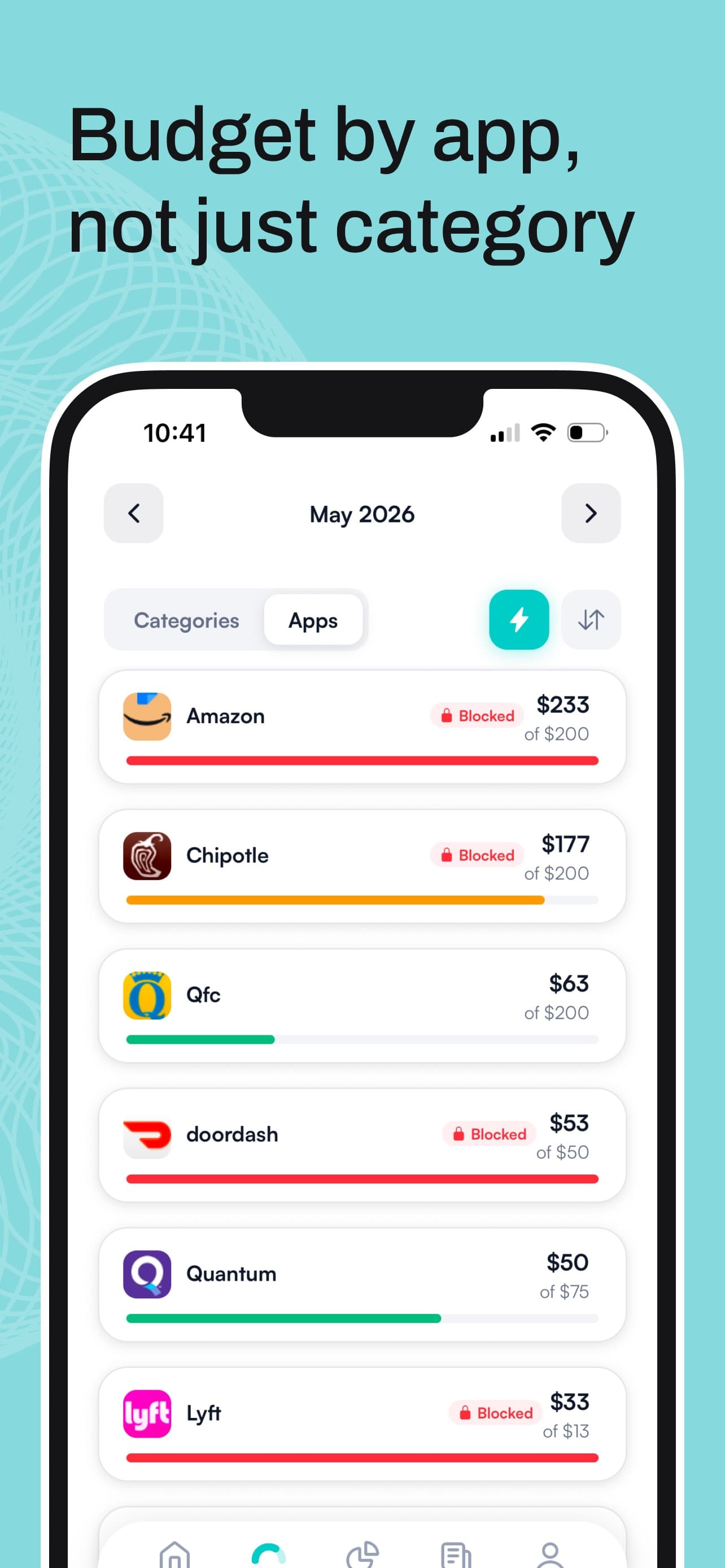
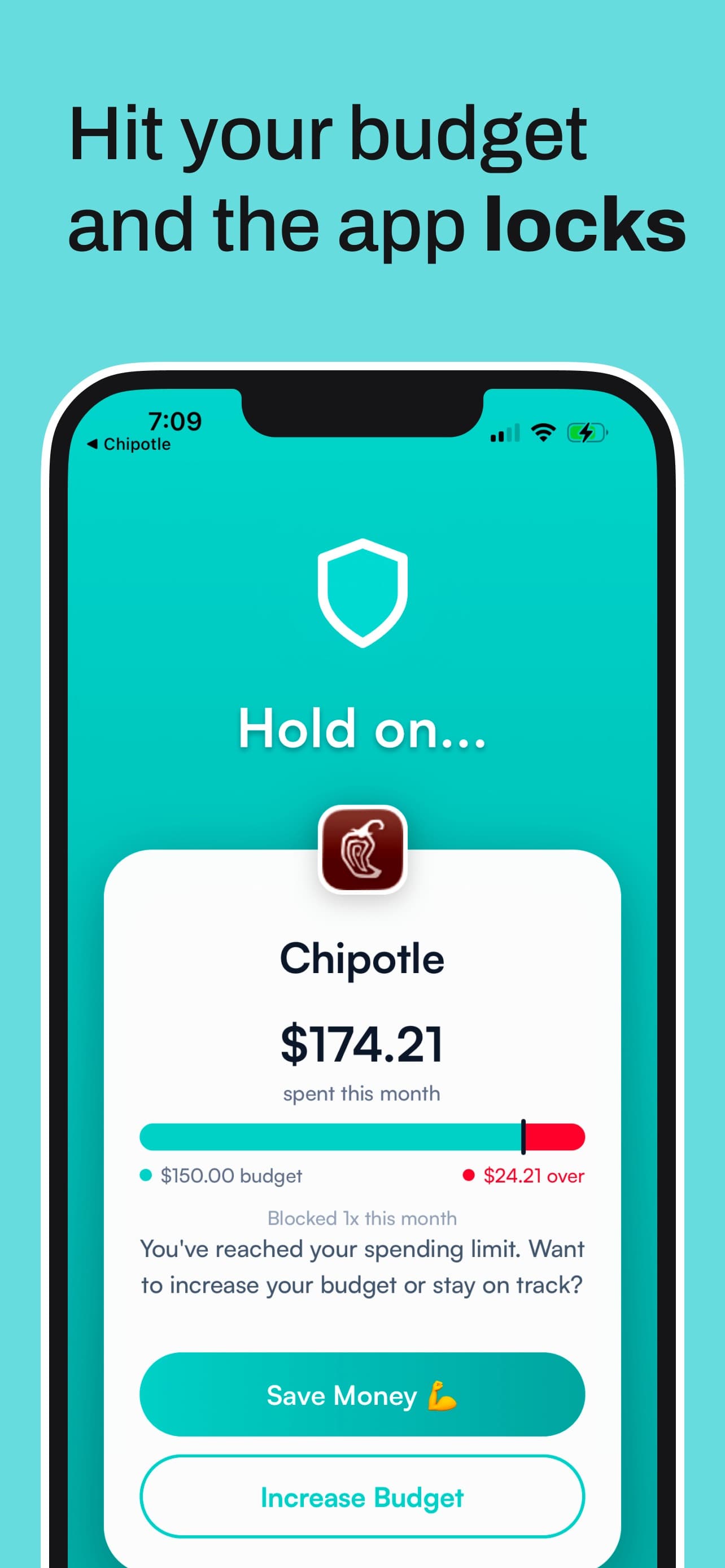
Why go after the app instead of the card? Because the card isn't where the decision happens. You open the app, you scroll, you tap. By the time a card limit would kick in, you've already decided. A locked app interrupts you before that. You can take a temporary unblock of about five minutes if you really need to check an order, but getting back in for real means raising the limit yourself, on purpose.
It's also honest about what it can't do. Hinder won't decline a charge at a store, and it only sees a purchase once your bank reports it, which can take minutes or hours. Pair it with a daily limit or a prepaid card if your problem is in person. We go deeper on that pairing in automated budget enforcement tools, and we lined up every app that blocks or slows spending in apps that stop you from spending money.
What's the best setup if you just want to stop overspending?
Stack two or three of these. No single one covers everything.
- Lower your daily purchase limit. Pick a number that covers a normal bad day, not a disaster. Call or use your bank's app.
- Turn on purchase alerts. Set a threshold low enough that you actually notice.
- Cap your phone spending. Either give each shopping app its own virtual card with a monthly limit, or use Hinder to lock those apps when the category budget runs out.
- Use cash or prepaid for one in-person category. Whichever one keeps surprising you.
If you're still figuring out which habit to break first, our guide to an app to stop overspending walks through it, and how to stop impulse buying on your phone covers the late-night scroll specifically.
What Hinder doesn't do
It doesn't limit, lock, or decline your debit or credit card. It's iPhone only, iOS 16 or later, with no Android or web version. There are no shared household budgets, no net worth tracking, and it won't cancel subscriptions for you. It's free to download with a one-week free trial, then a subscription.
Common questions
Can I set a monthly spending limit on my debit card?
Usually not on a regular bank debit card. Big banks set daily purchase limits, and some let you lower that daily number, but they don't offer a monthly budget cap. For a true monthly limit you need a virtual card service like Privacy.com, a kids or family card like Greenlight, or a reloadable prepaid card you only fund once a month.
How do I lower my debit card's daily purchase limit?
It depends on the bank. Wells Fargo has a Manage Debit Card Limits feature in its app and website. Chase says to contact them to request a different purchase limit, subject to approval. Capital One says you can lower your limit by calling them. Limits vary by account, so check yours first.
Can I block certain stores or categories on my debit card?
Rarely on a standard adult checking account. The big banks mostly offer card lock, international usage controls, and alerts. Merchant and category blocking shows up on family cards: Chase First Banking lets parents choose where a child can spend, and Greenlight lets you block stores or set a category to $0.
Does locking my debit card stop all charges?
No. Chase says locking blocks new purchases and ATM withdrawals but doesn't affect automatic payments. Wells Fargo says credits, refunds, and recurring payments the merchant flagged as previously authorized may still go through while your card is off. Lock is a pause button for new spending, not a full freeze.
Does Hinder put a limit on my debit card?
No. Hinder never touches your card. It reads your transactions through Plaid, and when a monthly category or per-app budget hits 100%, it locks the spending apps tied to that budget using iOS Screen Time. It warns you at 80%. It's iPhone only, iOS 16 or later.