The best no spend challenge app (2026)
A streak counter keeps score. You need something that also gets in the way.
The best no spend challenge app is Hinder. It does the two things a no spend challenge needs: it tracks a no spend streak for each app you're trying to quit, and it locks that app with iOS Screen Time once you go past the tiny budget you gave it. Trackers only count the slip. Hinder makes the next one hard.
Why do no spend challenges fail on day 4?
You know the pattern. Day one feels great. Day two, you meal prep and feel smug. Day three is fine. Day four is a Thursday, you're tired, and DoorDash is one thumb away. Twenty minutes later there's a bag on the porch and a broken streak in your app.
Scroll r/nobuy for a while and the slip-up posts sound the same. Nobody forgot they were on a no buy. They remembered, and the app opened anyway. That's the flaw in almost every no spend tracker: it records what happened after it happened. It has no say at 9pm, which is the only moment that counts.
So a no spend challenge app has two jobs. Keep the streak visible so you want to protect it. And put a wall between you and the apps you'd break it in. Most apps do the first. Almost none do the second.
What is the best no spend challenge app?
Hinder, because it does both jobs. It connects to your bank and cards through Plaid, so it sees real transactions instead of whatever you remember to log. Every app you connect gets its own no spend streak and an estimate of what you've saved by staying out of it. That's the scoreboard.
The wall is the budget. Give DoorDash a tiny monthly budget, say $5, and the first order that pushes you past it locks the app for the rest of the month. You get a push at 80% of the limit and the block lands at 100%. Group your delivery apps under one category and blowing it locks every one of them, so you can't just hop from DoorDash to Uber Eats.
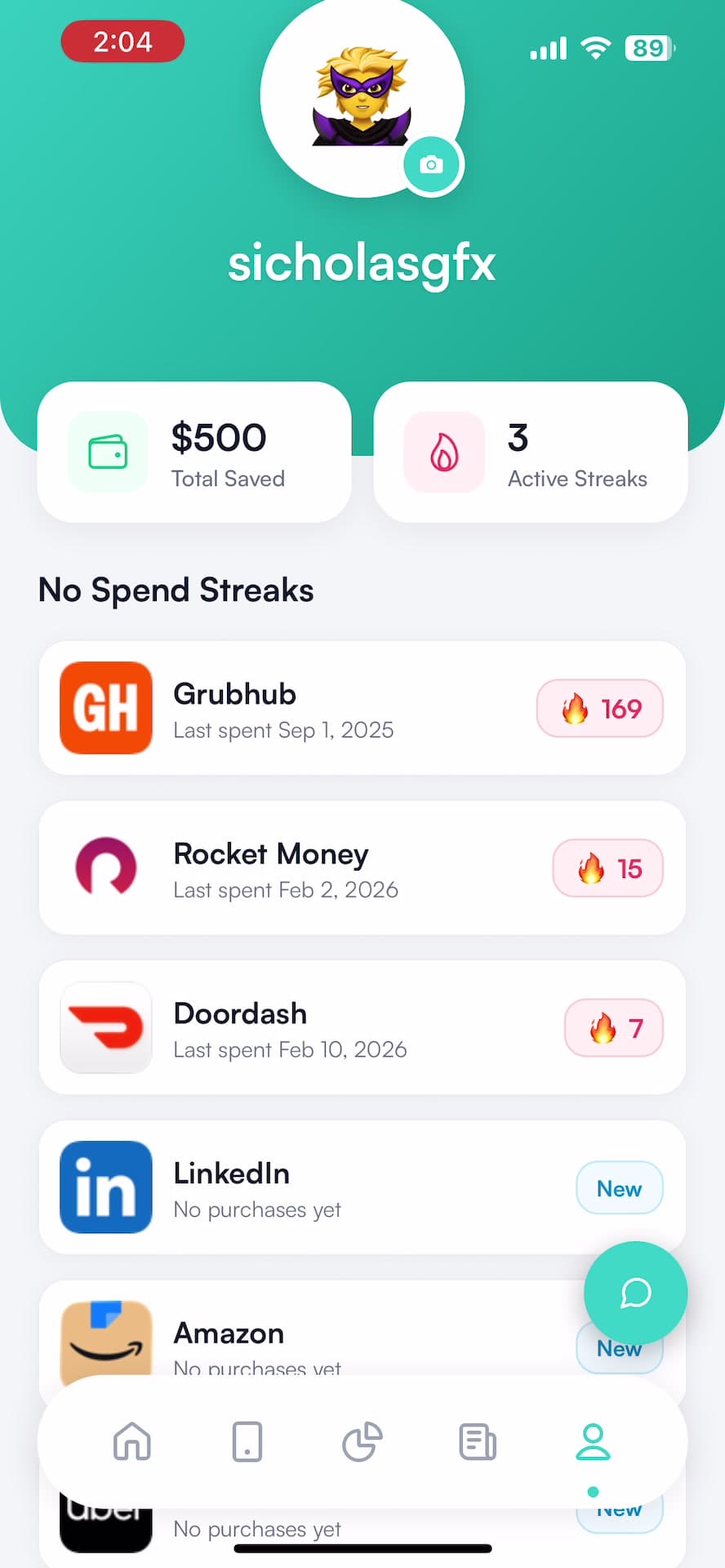
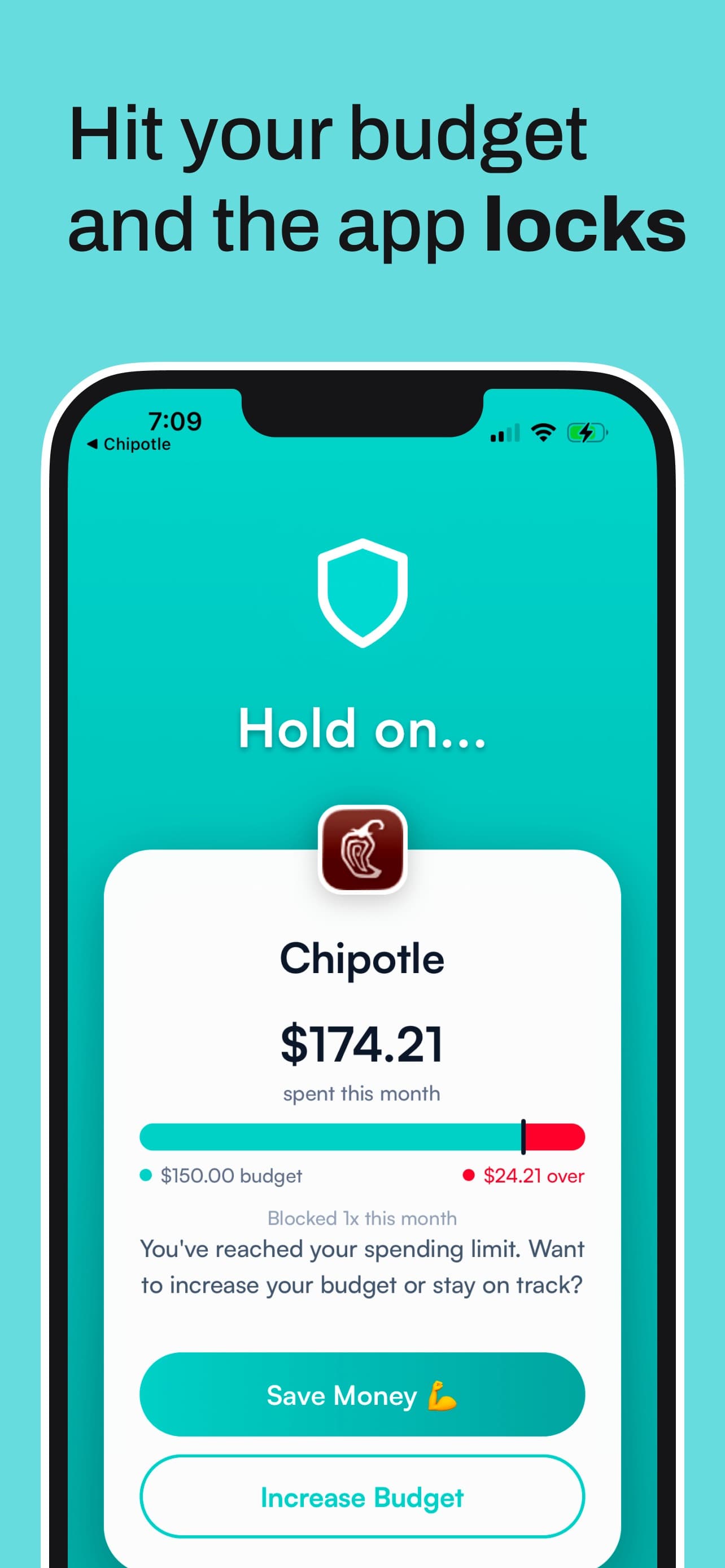
Be honest with yourself about one thing: Hinder enforces monthly limits on what you spend. It won't stop the very first purchase, because it reacts to real transactions. What it does is make sure one slip doesn't turn into a week of them. For most people that's the actual problem. It's iPhone only (iOS 16 and up), free to download with a 1-week free trial, then a subscription. No Android, and no shared budgets if you're doing the challenge as a couple.
How do you do a no spend challenge?
Here's the version that survives day 4, using Hinder for the parts willpower is bad at.
- Pick the length. A weekend if you're testing yourself, a month if you want the habit to actually change. A no buy year is a big swing, and most people who finish one set a short allowed list.
- Write your rules. List what's exempt (rent, bills, groceries, gas, medicine) and what's banned. Be specific. "No takeout" is vague. "No DoorDash, no Uber Eats, no drive-thru" is a rule.
- Connect your bank. Download Hinder on iPhone and link your accounts through Plaid. Now your streaks run on real transactions, not your memory.
- Set a tiny monthly budget for each banned app. A few dollars for DoorDash, a few for Amazon, a few for Temu. Or make one category for all of them so they lock together. Our guide to adding apps to block walks through choosing them and approving Screen Time.
- Watch the streaks. Each app's no spend streak and estimated savings is the thing you're protecting. Check it when the craving hits. It's weirdly effective.
- Let the lock do its job. If you slip, the app locks once you're past its budget. Tap through and you get about five minutes. Actually getting it back means raising the limit yourself, on purpose, which is a much bigger ask than tapping an icon.


What counts as a no spend day?
A no spend day is a day you buy nothing outside the essentials you named before you started. Bills on autopay don't break it. Groceries from your list usually don't either. A $14 burrito delivered for $27 absolutely does.
The gray areas are where challenges quietly die. Is a coffee with a friend social or spending? Is an Amazon refill of something you ran out of a need? Decide now, not while you're holding your phone. If delivery is your weak spot, our piece on why food delivery gets so addictive explains why the rules you make at 2pm fall apart at 9pm.
What are the other no spend apps worth trying?
Plenty of apps will count your no spend days. Here's what each is good at, and what it can't do.
NoBuy: No Spend Challenge Game
Best if streaks motivate you. A gamified streak tracker for iPhone. Your no buy streak grows a little plant or hero, you can spend a "freeze" to save the streak after a slip, and a Tempted? button starts a 10-minute countdown. There's digital cash stuffing too. It doesn't connect to a bank, so it only knows what you tell it, and it can't block anything. Free with paid premium plans.
Stop Impulse Buying | Budget
Best all-in-one tracker. A no spend calendar that highlights your streaks, a 52-week savings challenge, an impulse savings tracker, and a short questionnaire that tells you buy or don't buy. All manual, no bank connection, no app blocking. Free to download, Premium is $9.99 a month or $49.99 a year after a 7-day trial.
 YNAB
YNAB
Best if you need a budget, not a challenge. YNAB doesn't have a no spend mode. What it has is a method: give every dollar a job before the month starts, so a no spend month is just a plan with a lot of zeros in it. $14.99 a month or $109 a year after a 34-day free trial. It shows you the overspend clearly. It won't stop it. YNAB vs Hinder covers when people run both.
 EveryDollar
Best for zero-based budgeting on a budget. Dave Ramsey's app does zero-based budgets. The free version means typing in every transaction yourself, which is honestly not bad discipline during a no spend month. Premium connects your bank. Like YNAB, it tracks. It doesn't block.
A paper calendar or the Notes app
Best free option. Print a month, put an X on every no spend day, stick it on the fridge. It costs nothing and a visible chain of Xs works on the same part of your brain as any streak app. It also has zero power at 9pm when the phone is in your hand and the fridge is in the other room.
Which no spend app does what?
| Option | Tracks streaks | Sees real spending | Stops a slip |
|---|---|---|---|
 Hinder Hinder | Per app, with est. savings | Yes, via Plaid | Locks the app past its budget |
| NoBuy | Yes, with freezes | No, manual | 10-minute Tempted? pause |
| Stop Impulse Buying | No spend calendar | No, manual | No |
 YNAB YNAB | No | Yes | No |
 EveryDollar EveryDollar | No | Premium only | No |
| Paper calendar | Yes, Xs on the fridge | No | No |
Hinder- Tracks streaks
- Per app, with est. savings
- Sees real spending
- Yes, via Plaid
- Tracks streaks
- Yes, with freezes
- Sees real spending
- No, manual
- Tracks streaks
- No spend calendar
- Sees real spending
- No, manual
YNAB- Tracks streaks
- No
- Sees real spending
- Yes
EveryDollar- Tracks streaks
- No
- Sees real spending
- Premium only
- Tracks streaks
- Yes, Xs on the fridge
- Sees real spending
- No
Do you need a no spend app, or an app that blocks spending?
If you've finished a no spend month before and just want the satisfying calendar, any tracker above will do. If you've started five and finished none, the tracker isn't your problem. Blocking is.
That's a bigger topic than one challenge, and we've covered it twice: our short pick for the best app to stop spending money and the longer ranked list of apps that stop you from spending money, including blockers that work on a schedule instead of a budget. And if one app is breaking every challenge you start, here's how to stop ordering DoorDash for good.
Common questions
Is there an app for a no spend challenge?
Yes, a few. Streak trackers like NoBuy and Stop Impulse Buying let you mark no spend days on a calendar. Hinder goes further on iPhone: it connects to your bank, keeps a no spend streak for each app you choose, and uses iOS Screen Time to lock that app once your spending in it crosses the small monthly budget you set.
What counts as a no spend day?
A day where you buy nothing outside the essentials you agreed on before the challenge started. Most people exempt rent, bills, groceries, gas, and medicine, and ban takeout, delivery, coffee runs, clothes, and anything that arrives in a box. Write the list down on day one, because the rules you make up mid-craving are always looser.
How long should a no spend challenge last?
Start with a weekend or a week if you've never done one. A no spend month is the classic, long enough to break the habit of reaching for DoorDash or Amazon on autopilot. A no buy year, the kind people post about on r/nobuy, usually works better as a low buy year with a short list of allowed purchases.
Is there a free no spend tracker app?
The dedicated trackers are free to download with paid upgrades, and a paper calendar or the Notes app costs nothing. None of those can stop a purchase, though. Hinder is free to download with a 1-week free trial, then needs a subscription.
What do you do if you break a no spend challenge?
Log it, figure out which app or trigger did it, and keep going. Breaking one day doesn't erase the other 20. The useful move is making that same slip harder next time, which is why Hinder locks the app you slipped in once you're past its budget instead of just resetting a counter.