Is there an app that locks your money so you can't spend it?
There are six ways to lock money up, and they solve different problems. Pick the wrong one and you'll unlock it by Friday.
Sort of. No mainstream US app will hold your checking balance hostage, but you can get close four ways. Put savings where withdrawals hurt (a CD, I bonds, or a holiday club account). Freeze your card in your bank's app. Cap spending with a Privacy.com virtual card. Or lock the apps you spend in with Hinder.
Which one you need depends on where the money actually leaks. Savings you keep raiding is a different problem from a DoorDash habit, and a frozen card does nothing for either if you just unfreeze it. Here's how to match the lock to the leak.
Which kind of money lock do you actually need?
Locking savings protects a pile of money. Locking cards or apps protects your everyday spending. Most people need the second and go looking for the first.
We checked each option against its provider's own pages in November 2026. Rules and fees change, so confirm with yours.
| Option | What gets locked | How hard to undo | Best for |
|---|---|---|---|
| CD or I bonds | A lump of savings, for a set term | Hard. Penalty, or flatly impossible for 12 months (I bonds) | Money you want to forget about |
| Holiday club account | Regular deposits until a payout date | Medium. Early withdrawal can close it and cost a fee | Saving for one known expense |
| Savings at a separate bank | Nothing, it just adds distance | Easy, but transfers can take days | Emergency fund you keep dipping into |
| Card lock in your bank app | New purchases on one card | Very easy. One tap | Pausing a card for a night or a week |
| Privacy.com virtual card | Spending past a cap on one merchant card | Easy. Raise the limit or use another card | Online shopping and subscriptions |
 Hinder | The spending apps on your iPhone, once a budget is spent | Deliberate. Raise your own limit to get back in | Delivery, shopping, and impulse buys on your phone |
- What gets locked
- A lump of savings, for a set term
- How hard to undo
- Hard. Penalty, or flatly impossible for 12 months (I bonds)
- What gets locked
- Regular deposits until a payout date
- How hard to undo
- Medium. Early withdrawal can close it and cost a fee
- What gets locked
- Nothing, it just adds distance
- How hard to undo
- Easy, but transfers can take days
- What gets locked
- New purchases on one card
- How hard to undo
- Very easy. One tap
- What gets locked
- Spending past a cap on one merchant card
- How hard to undo
- Easy. Raise the limit or use another card
Hinder- What gets locked
- The spending apps on your iPhone, once a budget is spent
- How hard to undo
- Deliberate. Raise your own limit to get back in
Look at the third column. That's the whole game. A lock you can undo in one tap while annoyed isn't really a lock. It's a speed bump. Speed bumps still help, but you should know which one you're buying.
How do you lock savings so you can't withdraw it?
Put it somewhere that charges you, or flat out refuses, when you try to take it early. CDs, I bonds, and holiday club accounts all do this.
CDs. A certificate of deposit holds your money for a fixed term. Pull it early and you pay a penalty. Capital One's 360 CD disclosures, for example, say the penalty is three months of interest for terms of 12 months or less and six months of interest for longer terms, regardless of when you redeem. They also warn the penalty can be more than the interest you've earned if you break it very early, which means it can eat into what you put in. That sting is the point.
I bonds. This is the closest thing to a real time lock in the US. TreasuryDirect says you can't cash an I bond for the first 12 months, period. Cash it before five years and you lose the last three months of interest. You can buy as little as $25 and up to $10,000 a year in electronic I bonds per Social Security number. No app, no button, no late-night exception.
Holiday club accounts. The old-school version, and still offered by plenty of credit unions. You deposit through the year and the money pays out on a set date. BCU's holiday club, for one, moves the balance to regular savings on or after November 1, and a withdrawal before the last two weeks of October closes the account with a $15 fee. Terms vary a lot between credit unions, so read yours.
Here's the honest catch. None of these stop you from spending. They stop you from spending that money. If your checking account runs dry every month and you lock away savings anyway, you're likely to end up putting the gap on a credit card. Lock savings once your everyday spending is under control, not before. And this is general info, not advice for your situation.
Does moving money to a different bank actually work?
Yes, for savings you keep raiding. It's not a lock, but the delay does a lot of the work.
When your savings sits next to checking in the same app, moving it is instant and invisible. Put it at a separate bank and it takes time. Ally, for example, says standard external transfers can take up to three business days, though some accounts get next-day transfers. Three days is long enough for most urges to pass. Don't link a debit card to it, don't add it to your main bank's app, and the friction stays real.

Kudzu+ · $4.95/mo · Locked goals you can unlock any time
Some apps sell a "locked" savings goal. Kudzu is one US example: on its Kudzu+ plan ($4.95 a month) you can lock a goal so money can't be transferred out of it. Its own FAQ also says you can unlock a goal anytime. So it's a reminder with a button, not a vault. Some banks abroad, like ABN AMRO in the Netherlands, offer savings locks with a built-in waiting period, but we couldn't find a mainstream US bank doing the same.
Can you freeze your own card to stop spending?
Yes, most big US banks let you lock your card in their app. It just isn't built to stop you.
Card lock is a fraud tool. Chase says a locked debit card stops new purchases and ATM withdrawals but doesn't touch recurring payments. The problem is obvious: the same app that locked the card unlocks it in one tap, and you're holding that app when the urge hits. It works for a planned cooling off, like locking the card for the weekend and leaving it locked. It works badly as a willpower substitute.
If what you really want is a cap rather than an on/off switch, we went through what each big bank allows in how to set a spending limit on your debit card. Short version: daily limits, yes; monthly budgets, rarely.
Can a virtual card cap what you spend?
Yes. A Privacy.com card with a monthly limit is the cleanest hard cap you can put on online spending.

Free plan, 12 cards a month · US only · iPhone app and web
Privacy gives you virtual card numbers funded from your US checking account. Each card gets a spend limit per transaction, per month, per year, or in total, and anything over it gets declined. The free Personal plan covers 12 new cards a month. Monthly limits run on a rolling 30 days with a small buffer for merchants that bill unevenly.
Make one card per leak. A $150 Amazon card. A $100 delivery card. Save each one in its app and delete your real card from it. Now the decline is automatic. The weakness is that your real card still exists, and typing it back in takes about thirty seconds when you're irritated at a decline. You also need to be eligible: Privacy is for US citizens and legal residents 18 or older with a US bank account.
Is there an app that locks the apps you spend in?
Yes. Hinder locks your spending apps on iPhone the moment a budget runs out. To be clear, it locks apps, not money.

Free to download, 1-week free trial · iPhone only
Hinder doesn't hold, move, or freeze a cent. Your money stays in your bank and your cards keep working. What it does is sit between you and the place the money goes. You connect your bank and cards through Plaid, then set monthly budgets by category or per app. At 80% you get a warning. At 100%, Hinder uses Apple's Screen Time to lock every connected app tied to that budget. Blow the shopping budget and Amazon, Temu, Shein, and the rest all lock at once.
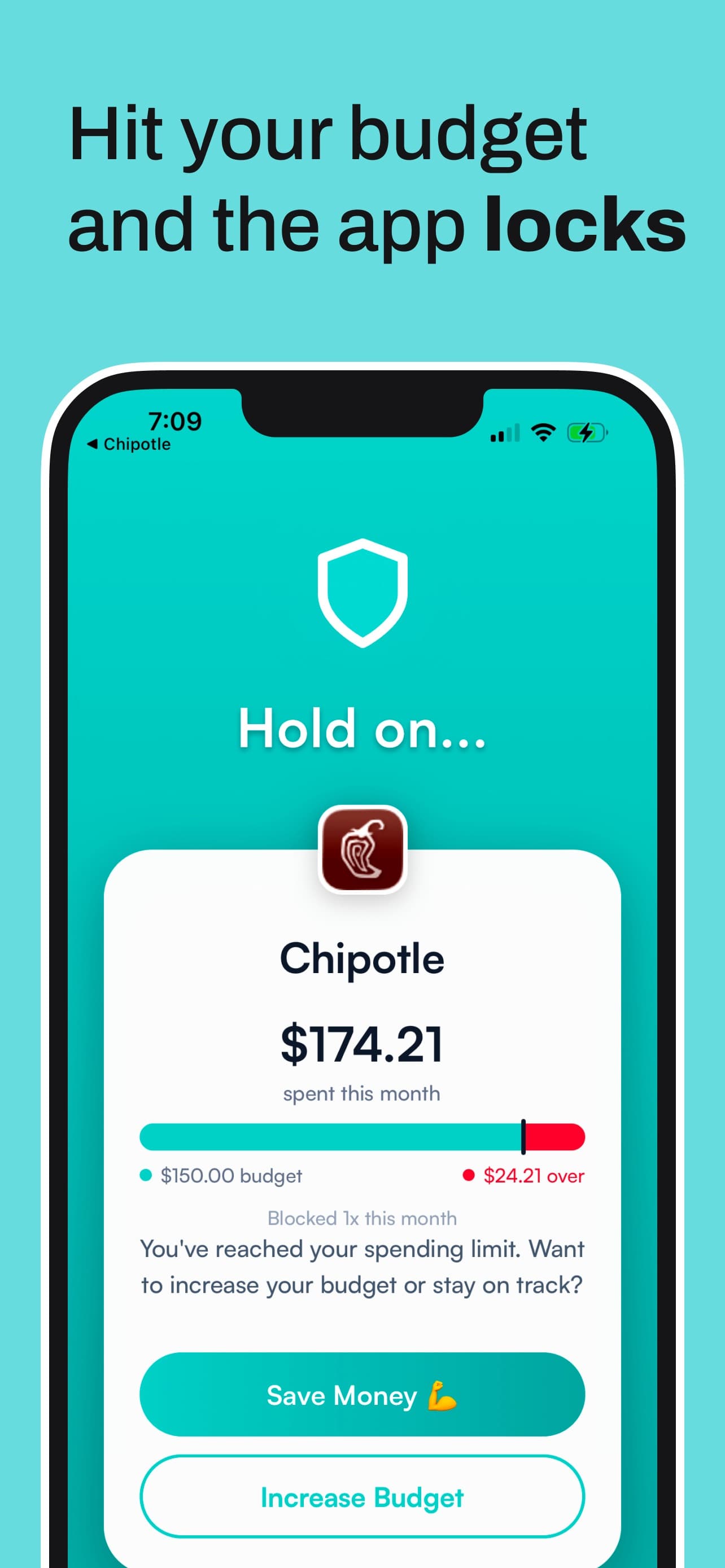
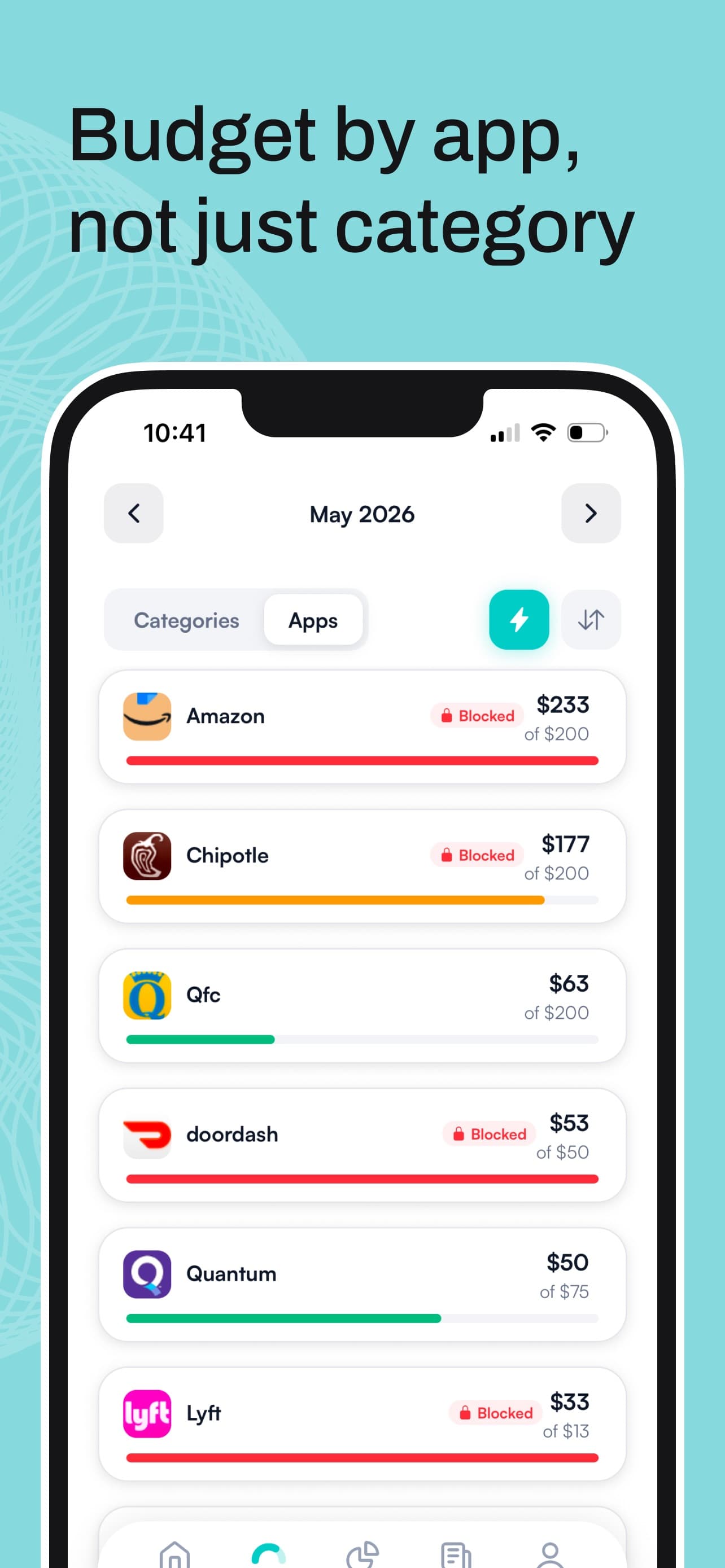
Why lock the app instead of the card? Because the app is where you decide. You open DoorDash, you scroll, you tap. A card lock or a cap only shows up after you've already made up your mind. A locked app stops the scroll before it starts. If you really need to check an order there's a temporary unblock of about five minutes. Getting back in for good means raising your own limit, which is a much harder thing to do with a straight face than tapping "unlock card."


It also tracks per-app no-spend streaks, so a week without Uber Eats shows up as a number you don't want to break. If you're curious how the Screen Time side works, we explained it in using Screen Time to control spending, and the streaks pair well with a no-spend challenge app approach.
Which lock should you pick?
Match it to the leak. Here's how we'd do it.
- You keep raiding savings. Move it to a separate bank first. If you still raid it, put part of it in a CD or I bonds, where breaking the lock costs real money.
- You're saving for one thing. A holiday club account or a CD that matures right before you need it.
- Online shopping and subscriptions get away from you. Privacy.com cards with monthly limits, one per merchant.
- The leak is on your phone. Food delivery, Amazon, late-night TikTok Shop. Lock the apps with Hinder. A card lock won't survive a hungry Tuesday.
- You just need a break. Lock your card for the weekend in your bank app. Free, and fine for that.
Most people need two of these, not one. Savings in a place that's annoying to reach, plus a lock on the apps where the spending happens. For more on the spending side, we compared every tool that adds friction in apps that actually stop you from spending money and picked a winner in the best app to stop spending money.
What Hinder doesn't do
It doesn't hold your money, lock your savings, freeze your cards, or decline a charge at a store. It only sees a purchase once your bank reports it. It's iPhone only, with no Android or web version, and budgets are monthly. It's free to download with a one-week free trial, then a subscription. No ads, and it never sells your financial data.
Common questions
Is there an app that locks your money so you can't spend it?
Not in the literal sense for everyday checking money in the US. What you can do is lock savings in a CD or I bonds, freeze your card in your bank's app, cap spending with a Privacy.com virtual card, or use Hinder to lock the spending apps on your iPhone once a budget runs out.
How do I lock money away so I can't touch it?
Use an account where getting the money out costs you something. A CD charges an early withdrawal penalty (Capital One's 360 CDs charge 3 or 6 months of interest depending on the term). I bonds can't be cashed at all for 12 months. A holiday club account closes and charges a fee if you withdraw early at some credit unions.
Can I lock my bank account from spending?
You can lock your debit card, which is the closest thing. Chase says a locked card stops new purchases and ATM withdrawals but doesn't affect recurring payments. You can unlock it again in seconds, so it works as a pause, not a commitment.
What is a money blocker app?
Usually it means an app that blocks spending rather than tracking it. Hinder is one: it connects to your bank through Plaid and, when a monthly category or per-app budget hits 100%, it locks the spending apps tied to that budget using Apple's Screen Time. It doesn't touch the money itself.
Does Hinder hold or freeze my money?
No. Hinder never holds, moves, or locks your money, and it doesn't freeze your cards. It reads your transactions and locks apps like Amazon or DoorDash on your iPhone when you go over a budget you set. Your money stays in your own bank the whole time.