Is there an app that makes you wait before you buy something?
The 24-hour rule and the 30-day rule both work. The hard part is actually waiting. These apps do the waiting for you.
Yes. CartPause, Wait Before You Buy, and Buy Later make you wait: you add the item instead of buying it, a timer runs from 24 hours to 30 days, and you decide when it ends. one sec adds a pause before a shopping app opens. Hinder goes further and locks your shopping apps once your monthly budget is spent.
That last distinction is the whole post, really. Some of these tools ask you to wait. One of them makes you. Which one you need depends on how good you are at ignoring your own rules.
Which apps build in a waiting period?
Six tools, all available in the US App Store, sorted by how hard they are to get around.
| App | How you wait | Can you skip it? | Price | Platform |
|---|---|---|---|---|
 Hinder | Shopping apps lock once your monthly budget is spent | Only by raising your budget | Free download, then subscription (1-week trial) | iPhone |
 CartPause | Share an item in, pick a 24, 48, or 72 hour timer | Yes, you can still open the store | Free; Pro $1.99/mo or $19.99/yr | iPhone, iPad, Apple silicon Mac |
 Wait Before You Buy | Timer from 24 hours to 30 days, then Skip it or Buy it | Yes | Free; $2.99 for unlimited items | iPhone |
 Buy Later | Fixed 10, 20, or 30 day hold per item | Yes | Free; $2.99 Pro upgrade | iPhone, iPad |
 one sec | A breathing pause every time a chosen app opens | Yes, after the pause | Free for one app; Pro $6.99/mo or $19.99/yr | iPhone, Android, browser |
| Screen Time | A daily time limit on shopping apps | Yes, unless you set a passcode | Free, built into iOS | iPhone |
Hinder- How you wait
- Shopping apps lock once your monthly budget is spent
- Can you skip it?
- Only by raising your budget
- Price
- Free download, then subscription (1-week trial)
CartPause- How you wait
- Share an item in, pick a 24, 48, or 72 hour timer
- Can you skip it?
- Yes, you can still open the store
- Price
- Free; Pro $1.99/mo or $19.99/yr
Wait Before You Buy- How you wait
- Timer from 24 hours to 30 days, then Skip it or Buy it
- Can you skip it?
- Yes
- Price
- Free; $2.99 for unlimited items
Buy Later- How you wait
- Fixed 10, 20, or 30 day hold per item
- Can you skip it?
- Yes
- Price
- Free; $2.99 Pro upgrade
one sec- How you wait
- A breathing pause every time a chosen app opens
- Can you skip it?
- Yes, after the pause
- Price
- Free for one app; Pro $6.99/mo or $19.99/yr
- How you wait
- A daily time limit on shopping apps
- Can you skip it?
- Yes, unless you set a passcode
- Price
- Free, built into iOS
Why does waiting before you buy work?
Because the urge to buy is loud and short, and almost nobody wants the same thing as badly a day later.
Online stores know this, which is why everything about them is built for speed. Saved cards, one-tap checkout, countdown timers on deals, “only 3 left.” Every one of those is there to close the gap between wanting and paying before the want wears off. A waiting rule just puts the gap back.
It's worth knowing that US law already believes in this idea, just not for you. The FTC's Cooling-Off Rule gives you three days to cancel certain sales made at your home or at a hotel or fairground pitch. It explicitly does not cover anything bought entirely online. So the place where most impulse buying happens has no cooling-off period at all unless you make one.
The other thing a wait does is turn a feeling into a decision. At 11pm you aren't deciding whether you want a $60 jacket. You're reacting to a picture of it. Three days later you're asking whether it's worth $60, which is a much easier question to say no to.
Should you use the 24-hour, 72-hour, or 30-day rule?
Match the wait to the price. Small stuff gets a day, mid-size stuff gets a few days, and anything that would hurt to lose gets a month.
- 24 hours for the cheap, constant stuff: the $14 Temu haul, the Sephora restock, the TikTok Shop thing a creator swore by. One night of sleep kills most of these.
- 72 hours for anything that feels like a treat: new shoes, a gadget, a nicer version of something you already own.
- 30 days for big purchases and for anything you'd put on a credit card you can't pay off this month.
Our honest take: most people pick a wait that's too long, then break it. A 24-hour rule you actually keep beats a 30-day rule you abandon on day four. Start short. If you're buying a lot from Temu and Shein specifically, we wrote a whole guide on how to stop buying on Temu and Shein.
Which apps hold an item for you until the wait is over?
Three iPhone apps do this well. You put the item in the app instead of the cart, and it tells you when the wait is up.

CartPause
Free; Pro $1.99/mo · iPhone, iPad, Mac · 24, 48, or 72 hours
CartPause is the slickest of the three. It lives in the Share sheet, so from any shopping app or website you tap Share, pick CartPause, and it grabs the product name, price, and image on its own. You choose 72, 48, or 24 hours and get a notification when the pause ends. The free plan has unlimited paused items, which is generous. Pro ($1.99 a month, $19.99 a year, or $39.99 once) adds spending and savings insights, a widget, and a no-pressure wishlist it calls the Someday List.

Wait Before You Buy
Free; $2.99 for unlimited items · iPhone · 24 hours to 30 days
If you searched for a “skip or buy” app, this is the closest match. You add the thing, set a wait of 24 hours, 3 days, 7 days, 2 weeks, or 30 days, and when time is up it asks whether you still want it, with a Skip it or Buy it choice. It tracks how much you've saved by skipping and keeps a skip streak. Data stays on your phone and there's no account. Unlimited items is a one-time $2.99.

Buy Later
Free; $2.99 Pro · iPhone, iPad · 10, 20, or 30 days
Buy Later is the 30-day rule app in its purest form. Every item gets a fixed hold of 10, 20, or 30 days, you get one notification when it's done, and that's it. No ads, no sign-in, no subscription, everything on device. If CartPause feels like too much app, this is the minimalist pick.
The weakness all three share: they only work if you open them instead of the store. Nothing stops you from closing CartPause and tapping Buy Now in Amazon. They're a habit, not a lock. We cover more of these in our roundup of apps to stop impulse buying.
No app at all? Apple Reminders works too. Paste the product link into a reminder dated 30 days out. It's crude, but the rule is the same.
Can an app make you wait before you open Amazon?
Yes. one sec and Apple's own Screen Time put the wait in front of the shopping app itself, so you don't have to remember to use anything.

one sec
Free for one app; Pro $6.99/mo or $19.99/yr · iPhone, Android, browser
one sec runs a short breathing animation every time you open an app you picked, then asks if you still want in. Its own description is clear that it delays access instead of blocking it. It's mostly sold for social media, but point it at Amazon or Temu and it works the same. One app is free, which is enough if one store is your problem. It also has a free Safari extension for shopping websites.
Screen Time App Limits
Built into every iPhone and free. Give your shopping apps a daily limit, say 10 minutes, and when it runs out you get a limit screen. The catch is the button under it. By default you can ask for one more minute, a 15-minute reminder, or ignore the limit for the day. Turn on Block at End of Limit and have someone else set the Screen Time passcode, and it gets much harder to wave off. Full setup is in our guide to blocking shopping apps on iPhone.
Both of these are about time, not money. They don't know if you've spent $20 this month or $900. We break down that gap in whether there's a Screen Time app for spending.
What's the difference between a delay you can skip and a hard stop?
A delay asks you to wait and then lets you through. A hard stop keeps the door shut until something real changes.
Every timer app above is a delay. That's fine on a good day. The trouble is that you don't impulse buy on good days. You do it tired, bored, or a little sad, which is exactly when skipping a timer feels reasonable. A rule you can override in one tap is a rule your worst mood gets to vote on.

Hinder
Free download, subscription required, 1-week free trial · iPhone
Hinder is the hard stop. It connects to your bank and cards through Plaid and tracks what you spend against monthly limits you set, by category and per app. It warns you at 80%. At 100%, it uses Apple's Screen Time to lock the spending apps you connected. Spend your shopping budget on the 12th and Amazon, Temu, and Shein stay locked for the rest of the month.
So the wait isn't 24 hours or 30 days. It's “until next month.” That's the 30-day rule with teeth, aimed at the moment it matters: after you've already spent what you planned to.
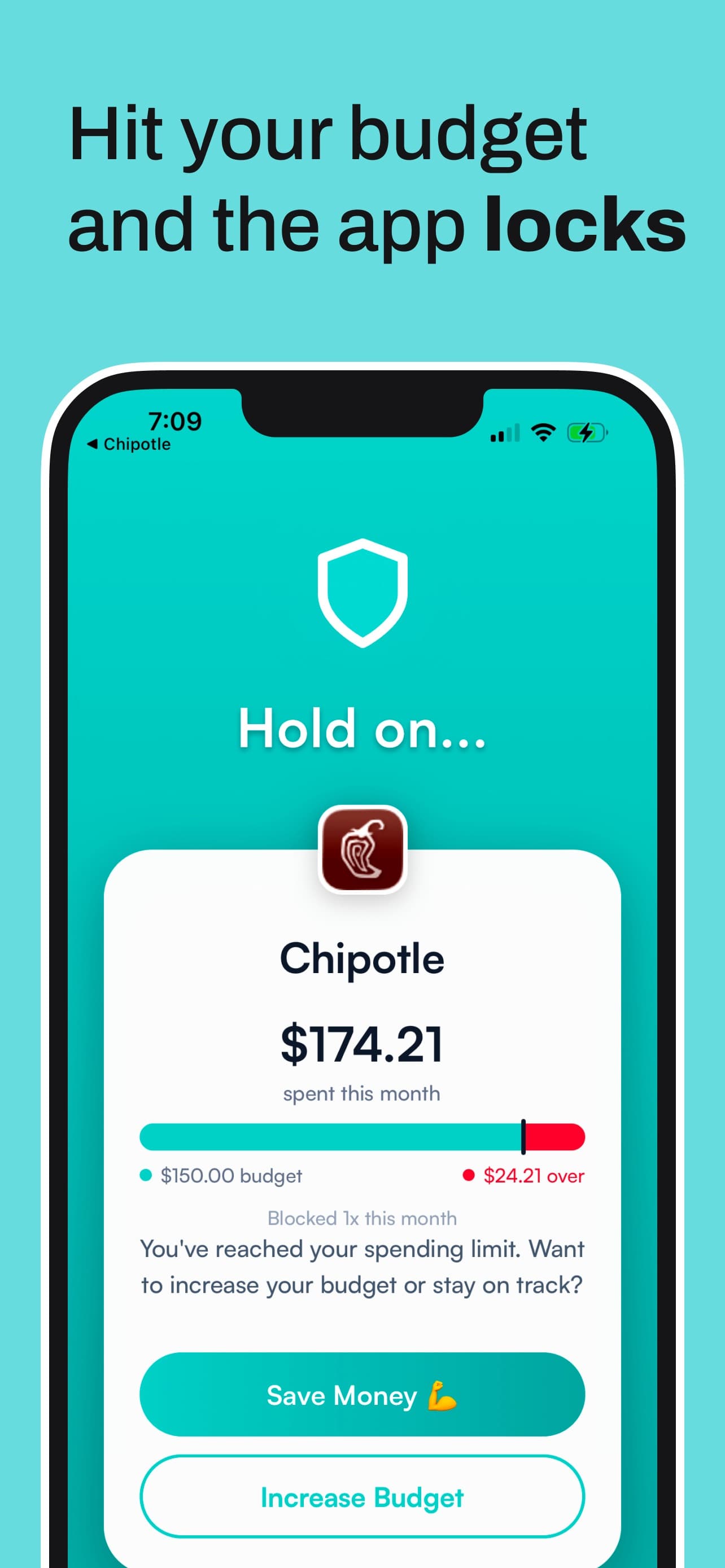
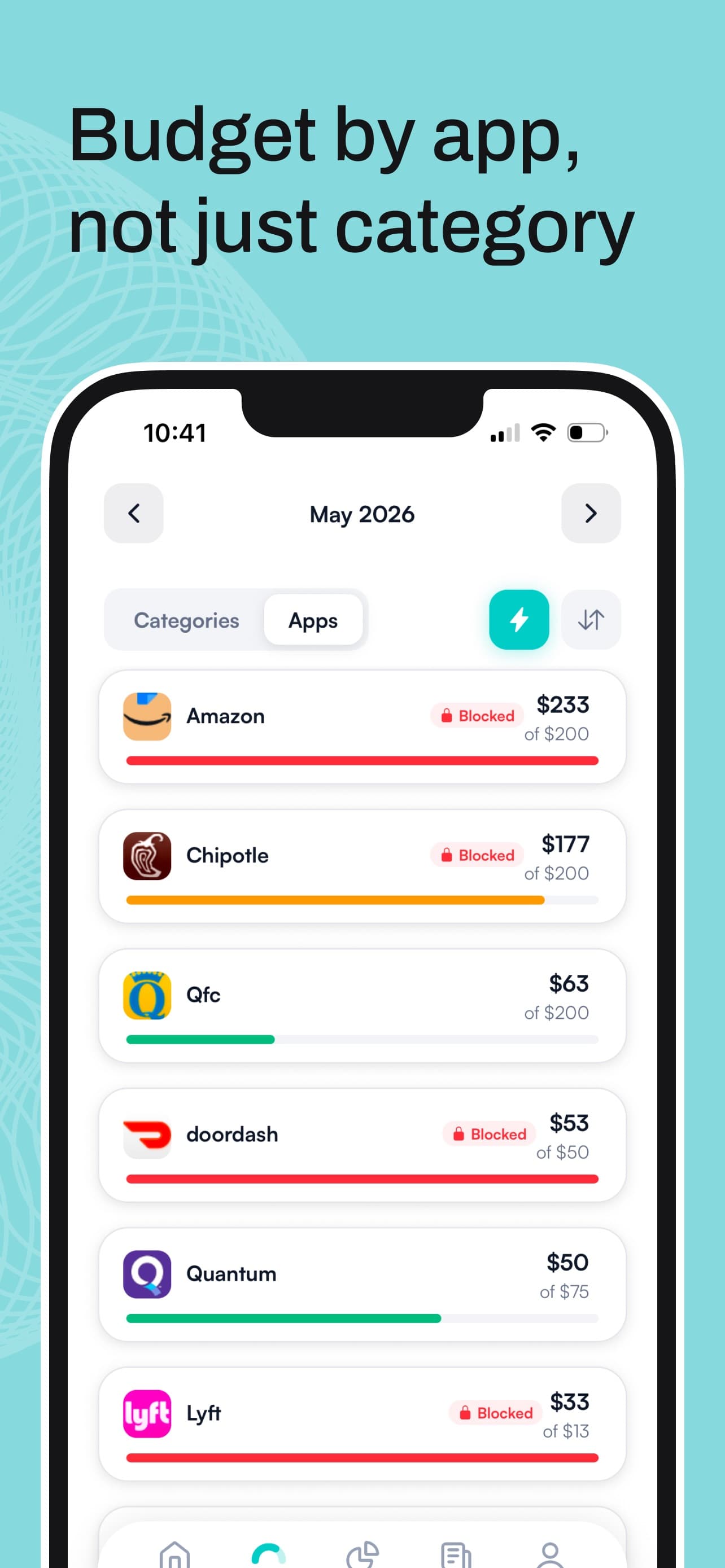
It isn't a prison, and it shouldn't be. The block screen has two buttons: Save Money, or Increase Budget. You can get a temporary unblock of about five minutes, but the real way out is raising your limit, which means admitting to yourself that you're choosing to spend more. That small bit of friction is the point. And under budget, nothing locks, so normal shopping stays normal.
To be clear about what Hinder doesn't do: it has no per-item timer and doesn't hold your cart. If you want a 72-hour pause on a single pair of sneakers, that's CartPause's job. Hinder handles the month. It also keeps a no-spend streak for each app, which turns not opening DoorDash into something you don't want to break. It's iPhone only, has no ads, and never sells your financial data. More on how it compares in our list of apps that actually stop you from spending money.


How do you set up a waiting rule that actually sticks?
Stack a short delay on each purchase with a hard stop on the month. One catches the single impulse, the other catches the pile-up.
- Pick one timer app (CartPause if you want polish, Buy Later if you want nothing extra) and make it the only place wanted things go.
- Delete your saved cards from Amazon, Temu, and Shein so buying takes a minute instead of a tap.
- Put one sec or a Screen Time limit on your worst shopping app so opening it isn't automatic.
- Set a monthly shopping budget in Hinder so that when the month's money is gone, the apps go with it.
If TikTok Shop is where the money leaks, the setup is a bit different, since the store is inside the app you scroll. See how to stop impulse buying on TikTok Shop. And if you want to go further than waiting, a no-spend challenge is the same idea stretched to a whole month.
Common questions
What is the 30-day rule for shopping?
When you want something you don't need, you write it down and wait 30 days before buying it. If you still want it and can pay for it without touching your bills, buy it. Most of the time the want is gone before the month is.
Is there a free app for the 24-hour rule?
Yes. CartPause is free with unlimited paused items and lets you pick a 24, 48, or 72 hour wait. Wait Before You Buy and Buy Later are also free to download, with a one-time $2.99 upgrade for more items or pro features.
Can an app stop me from buying something before I check out?
Only if it can get between you and the store. Timer apps like CartPause work when you share the item into them instead of buying it. one sec and Screen Time put a pause or limit on opening the shopping app. Hinder locks connected shopping apps through Screen Time once your monthly budget is spent.
Does the FTC cooling-off rule cover online shopping?
No. The FTC's Cooling-Off Rule gives you three days to cancel certain sales made at your home or at temporary locations like hotels and fairgrounds. It explicitly does not cover sales made entirely online, by mail, or by phone. For online shopping, any cooling-off period is one you build yourself.
What's the difference between a purchase delay and a spending block?
A delay makes you wait, then lets you buy if you still want to, and you can usually skip it. A block keeps the app closed until a condition changes. Hinder's block lifts when the month resets or when you raise your budget on purpose.