How to stop spending money at Target
To stop spending money at Target, go in with a written list, use Drive Up for that list only, kill the Target app's push notifications, and put a hard monthly cap on shopping. Hinder does that last part: cross your shopping limit and it locks the Target app on your iPhone. Willpower alone loses to a store designed by professionals.


One shopping limit can lock Target, Amazon and Walmart at once.
Why do I always spend more at Target?
Because it's supposed to work that way. People even have a name for it: the Target effect. You walk in for milk, you walk out with a candle, two throw pillows and a shirt you didn't need. Retail experts point at the same culprits every time. Oversized carts. Displays grouped so one item suggests three more. A coffee counter by the entrance that keeps you in the store longer. A dollar section that feels too cheap to count.
None of it feels expensive in the moment. That's the trick. Say a $10 trip turns into $80. Do that every weekend and you're looking at over $250 a month you never planned to spend.
Does the Target app make it worse?
Often, yes. The store at least requires you to drive there. The app is on your couch with you. Target Circle is free to join and surfaces deals right in the app, and push notifications nudge you back in when something goes on sale. A deal on something you weren't going to buy isn't savings. It's spending with a nicer label. If you keep catching yourself browsing late at night, that's the same loop we cover in our guide to apps that stop impulse buying.
How to stop impulse buying at Target
- Write the list before you leave. Not in your head. On paper or in Notes. If it's not on the list, it stays on the shelf.
- Use Drive Up with a set list only. Drive Up is free and has no order minimum, and you never walk past the endcaps. Order exactly what's on the list, then close the app. Scrolling "just to see" undoes the whole point.
- Turn off Target push notifications. Go to Settings, then Notifications, then Target, and switch off Allow Notifications. Fewer deal alerts, fewer reasons to open the app.
- Bring cash or a fixed budget. A $40 bill is a hard stop. A credit card isn't.
Can you block the Target app on iPhone?
You can, and the tool matters. Screen Time limits time, and you know your own passcode. A Target order takes two minutes. A time limit won't notice. Our breakdown of using Screen Time for spending explains why it falls short. What actually works is a lock tied to dollars, which is the whole idea behind blocking shopping apps on iPhone by budget.
How to set a Target spending limit
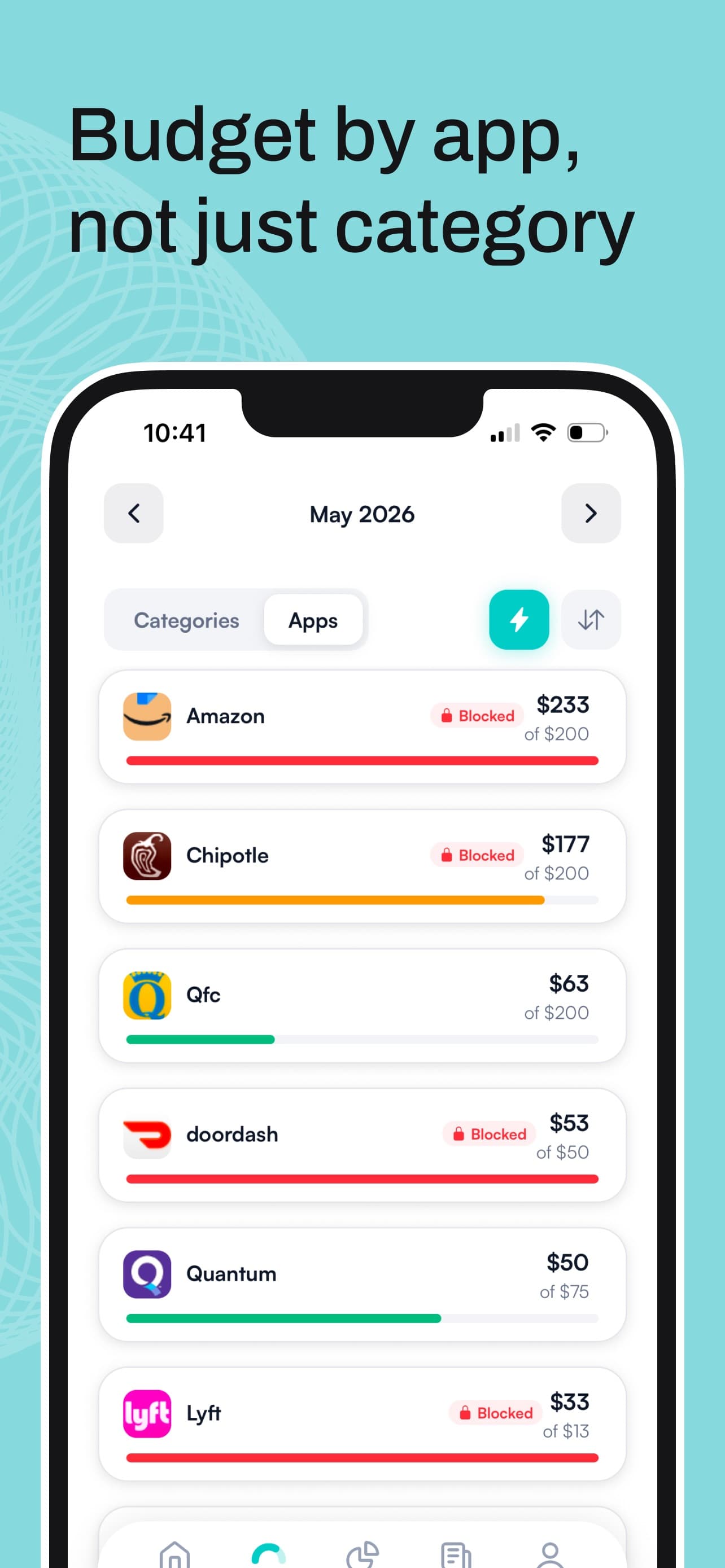
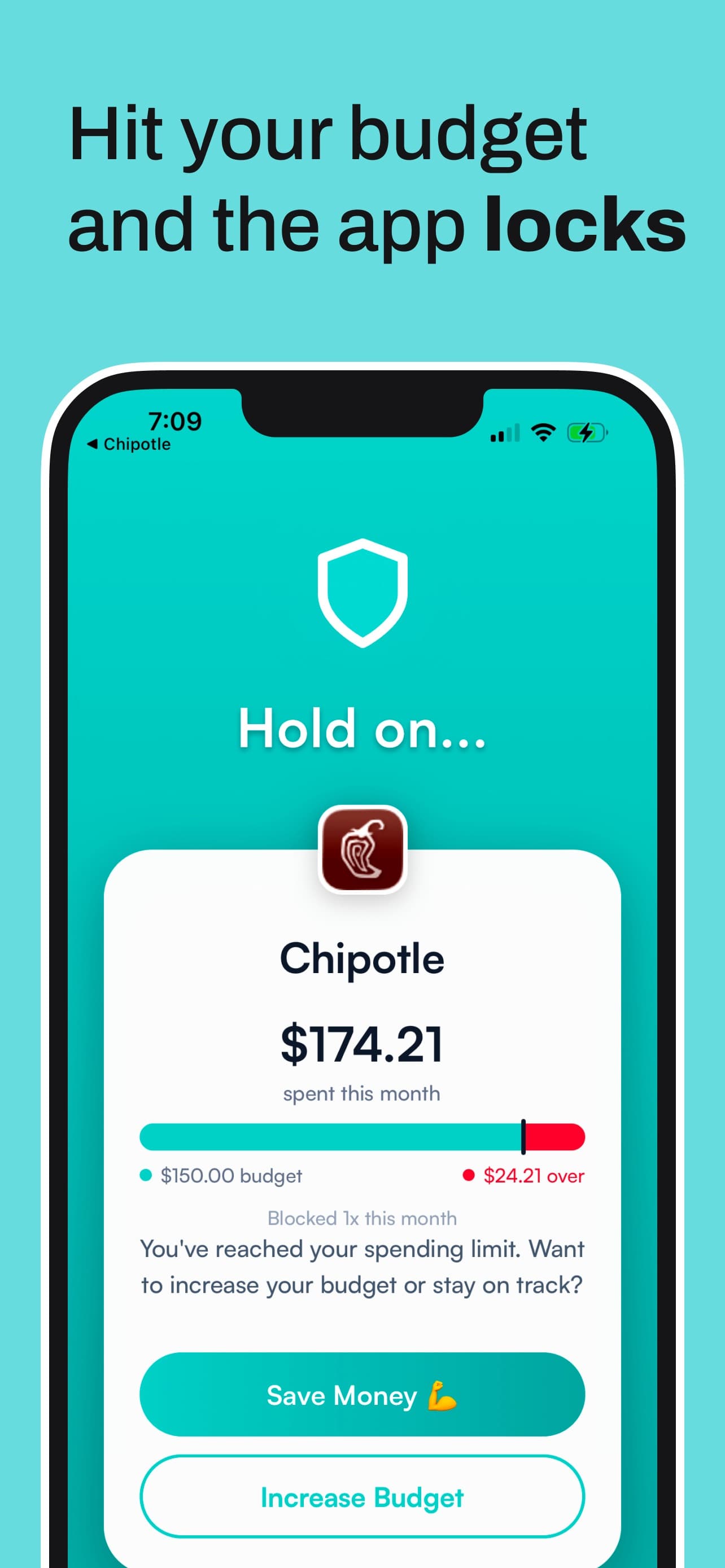
Hinder connects to your bank and cards through Plaid and lets you set a monthly dollar limit on a shopping category you create. Put Target, Amazon and Walmart in it. At 80% you get a warning push. At 100% every app in the category locks through iOS Screen Time. The shield gives you two buttons: Save Money, or Increase Budget. There's a short temporary unblock, but getting back in for real means raising your limit on purpose.
Honest caveat: Hinder blocks apps, not buildings. It can't stop you at the register. But your in-store Target purchases still hit your bank, so they count toward the same shopping limit. Overspend in the aisles on Saturday and the Target app is locked when you reach for it Sunday night. Same goes for blocking Amazon once the category is done for the month.
Set it up in two minutes
- Connect your bank and cards through Plaid.
- Create a shopping category and set a monthly dollar limit.
- Add Target, Amazon, Walmart and anything else that tempts you. Here's how to choose which apps to block.
If shopping feels less like a habit and more like something you can't stop, read our take on apps for shopping addiction, or compare other apps that stop you from spending money.
Common questions
What is the Target effect?
It's the joke name for walking into Target for one item and walking out with a full cart. Big carts, grouped displays, a cafe by the door and a dollar section all push you to stay longer and grab more.
Can you block the Target app on iPhone?
Yes. Hinder can lock the Target app with iOS Screen Time once your shopping spending crosses the monthly limit you set. Screen Time on its own only limits time, and you know the passcode.
Does Hinder stop me from spending in the Target store?
No. Hinder blocks apps, not stores. But because it reads your bank transactions, in-store Target purchases still count toward your shopping limit, and once you cross it the shopping apps lock.
Is Drive Up cheaper than going inside Target?
It can be, if you order from a fixed list and stop there. You skip the aisles entirely. It stops helping the moment you start scrolling the app for extras.
Is Hinder free?
Free to download and try. iPhone only. It connects to your bank through Plaid and uses iOS Screen Time to lock the apps you overspend in.